DEWESoft - Vehicle Dynamics
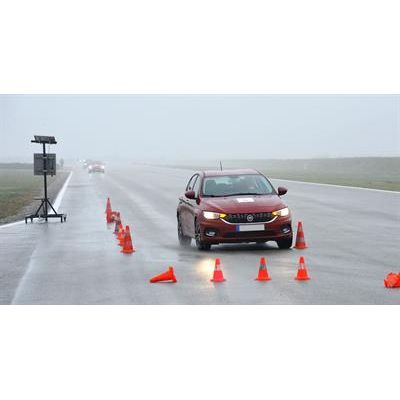
So-called Vehicle Testing Suite (VTS) is a suite of automated test workflows developed together with Leane International and tested by Fiat-Chrysler Automobiles in its European proving ground. The entire solution is based on top of Dewesoft X software and Dewesoft data acquisition systems and offers standard test maneuvers and quick pass/fail evaluation for the driver.
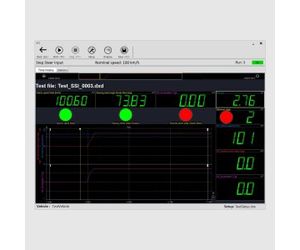
- REAL-TIME RESULTS: VTS and Dewesoft X software show all validation and visualize results in real-time during the test itself. Additional math or visualizing can be added later in post-processing if needed.
- AUTOMATED WORKFLOW: VTS offers pre-defined testing maneuvers for the test operator and easy-on screen controls for the operator to configure and run the tests.
- STANDARDIZED BY ISO AND ECE: All the available test maneuvres are configured and performed according to ISO and ECE standards.
- AUTOMATED RESULTS AND STATISTICS: VTS can show a summary table with statistics and can overlay results from a batch of test runs.
- DOWN TO 2 CM POSITION ACCURACY: We offer high-accuracy GPS or IMU (Inertial Measurement Unit) hardware with optional RTK support which offers the highest possible velocity and positioning accuracy.
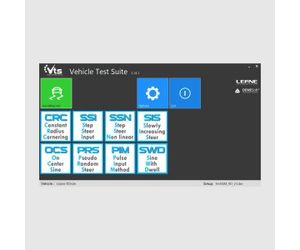
- SEVERAL MANEUVERS: VTS offers several standard maneuvers like Steady state cornering, Step steer input, Step steer non-linear, On center sinus steer, Pseudo Random Steer, Pulse Input Method, Slowly increasing steer, Sine with dwell and more test maneuvers under the development.
In spite of the increasing adoption of virtual analysis tools in the vehicle development process, the amount of testing activity is all but decreasing, due to several reasons:
- Detailed simulation models require reliable experimental data for validation.
- The refinement of some vehicle attributes still need the “human touch”, delivered by subjective and objective test and development on physical prototypes.
- The development and validation of advanced driving functions (ADAS, autonomous driving) still require extensive real-world testing.
In this context, in an extremely competitive global market, the testing process must be extremely efficient, considering:
Overall quality of the measurement
- Compliance and reproducibility of the test execution
- Data accuracy: sensors and acquisition system
Cost efficiency
- Preparation time: easy vehicle sensor setup and DAQ system configuration
- Actual test time: optimize the use of the time spent on the test track or on a test rig
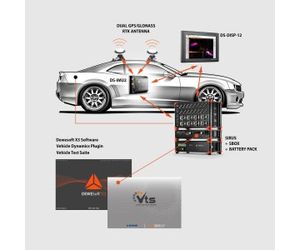
The image on the right shows the Vehicle Testing Suite data acquisition system which consists of:
- SIRIUS DAQ system: for the acquisition of analog signals and vehicle CAN bus.
- SBOX data logger and data processing computer: highly reliable SSD data logger and high-performance data processing computer.
- DS-BP2 battery pack: a battery pack that provides backup power next to car power supply.
- DS-IMU2 inertial measurement unit: for highly accurate GPS/GLONASS positioning and orientation.
- DS-DISP-12 display: in-car mountable high-brightness and high-resolution touch-screen LED monitor.
- Dewesoft X software with Vehicle Dynamics plugin and Vehicle Testing Suite package
Dewesoft Vehicle Test Suite provides easy-to-use automated testing for the following standard test maneuvers:
Test type: Ref. standard
- Steady state cornering: ISO 4138
- Step steer input: ISO 7401
- Step steer non-linear: Based on ISO 7401
- On center sinus steer: ISO 13674-1
- Pseudo Random Steer: ISO 7401, ISO TR-8726
- Pulse Input Method: ISO 17288-2
- Slowly increasing steer: ECE 13H
- Sine with dwell: ECE 13H
- More test maneuvers in development
For every type of test, validation criteria and other objective parameters are calculated and made available as calculated channels in the measurement files.
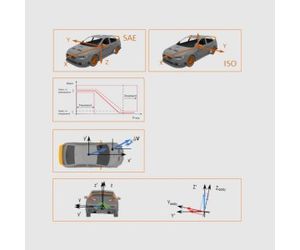
Dewesoft Vehicle Dynamics plugin is designed to carry on the pre-processing of the raw signals in accordance with the requirements of ISO standards for vehicle dynamics objective data analysis. All the settings can be managed in the Dewesoft setup. The main features include:
Data processing
- Catalog of standard test maneuvers
- Management of the coordinate system
- Filters
- Compensation of the sensor position effect
- Compensation of the g-force effect
Coordinate system
Given the details of the input channels, the output channels are calculated in the desired coordinate system.
Filter and synchronization
The input channels are filtered according to ISO 15037-1 / -2 or ECE 13H standards. Known sensor delays are compensated.
Compensation of the sensor position effect
Given the sensor location, the Dewesoft X Vehicle Dynamics plugin calculates speed and acceleration at the desired reference point.
Compensation of the gravity effect
The Dewesoft X Vehicle Dynamics plugin calculates the roll and pitch angle and compensates the effect of g-force, if the input acceleration is not in the horizontal plane.
VTS is an easy to use test automation tool and test driver interface on top of Dewesoft. It is designed in order to achieve the highest productivity on the test track with DS Vehicle Dynamics plugin. Main features:
- Support for DEWESoft Vehicle Dynamics plugin.
- Management of vehicle data and sensor coordinates data.
- International standards or custom test procedures.
- Dewesoft integrated into the VTS measurement panel.
- Quick look display of the main parameters and execution check.
- Automatic test file naming and storing in a custom folder structure.
- Data overlay and statistics from multiple test runs
- Modular architecture for easy extension and further customization.
The VTS application manages the configuration parameters of each type of test:
- Info: basic information about the test.
- Measurement settings: sample rate, Dewesoft screen ID, subfolder for data storage.
- Trigger conditions.
- Execution conditions: the allowed values of the nominal execution parameters, such as vehicle speed, path radius, steer frequency, etc.
- Validation condition: the admissible threshold values used in the validation check.
- The user can edit and store the default configuration of each type of test, based e.g. on the type of vehicle (passenger car or truck).
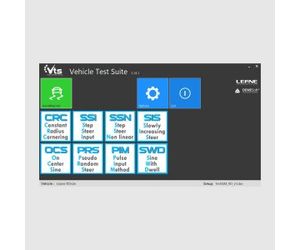
Everything that the test driver needs to control is available with a single touch on the bright and in-car mounted display. The test driver just selects the test session and the test maneuver to perform and set the parameters:
- Nominal conditions
- Start / stop storing controls
- Test setup
- Test analysis
- Save/cancel the test file
Right after stop storing, the test results are available, the driver can save or discard the data file and continue with the next test.