


- Home
- Companies
- Integrated Biometrics
- Products
- Integrated - Model Watson - Two-Finger ...
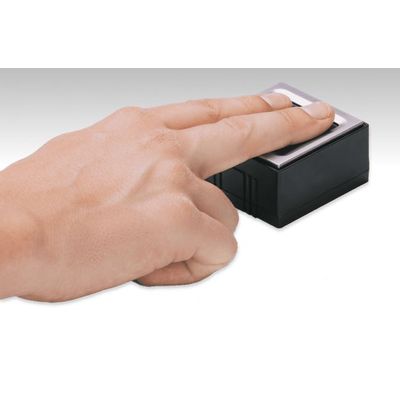
Integrated - Model Watson -Two-Finger Roll Scanner
The Watson is a small, light, and fast FBI Appendix F certified multi-fingerprint scanner that is ergonomic and easy to use. Watson is the world’s first optical scanner using IB’s patented LES technology instead of a traditional glass prism, meaning fast, high-quality images without the need to clean between finger rolls. It comes with a full featured SDK to enable effective integration into applications requiring certified quality images. The Watson can also cost effectively perform all requirements common in ten print enrollment applications.
- Rapid dry finger capture
- No need to clean latent prints in high-volume situations
- Easy integration via single SDK for all Integrated Biometrics FBI-certified products
- Unaffected by extreme temperatures, direct sunlight, or bright artificial lights
- Compact, lightweight, and rugged
- Rejects common spoofing attacks
- Emits no bright lights during scans
- Meets or exceeds US military durability specifications
- Competitive pricing
- Extremely low power consumption
- Eliminates consumables (silicone membranes or cleaning tape)
- Lower maintenance costs
Windows Desktop Editions 7, 8, 10, 11
Linux Kernel 4.0 or newer (32/64 bit, ARMv6, ARMv7)
- Ubuntu 18.04, 20.04 or newer
- Debian 10, 11, or newer
Android 10, 11, 12
CPUx86 and x64 | 2.0GHz or higher ARM | 1.0 GHz or higher
Memory512MB or higher
LES
CameraCMOS
Resolution500 ppi
Grayscale256 grayscale dynamic range
Image Size800 x 750 pixels
Supported Image FormatsRAW, JPEG2000, BMP, PNG, WSQ (FBI-approved)
256-bit AES keys and RSA algorithms
FBI / Image CertificationsCertification Mobile ID IQS FAP 45, PIV, GSA FIPS201, FBI Appendix F
SpeedMinimum > 10fps for Galaxy Nexus 1.2 GHz dual-core ARM Cortex-A9 or equivalent; 17 FPS for Intel 2.8 GHz processor or equivalent
API InterfaceCapture single-finger/two-finger direct, single-finger rolls, multi-device / multi-thread support
Quality ScoringNFIQ v1 supported on all OSes and NFIQ2 for Windows
< 180 grams / 0.40 lbs (not including cable)
Platen Size40.64 mm x 38.1 mm / 1.6” x 1.5”
Sensing Area40.64 mm x 38.1 mm / 1.6” x 1.5”
Scanner Assembly Dimensions60.3 mm x 62.3 mm x 33.04 mm / 2.37″ x 2.45” x 1.30”
USB 2.0
Power SourceUSB Host
USB Voltage Level4.4V to 5.25V
USB-IF USB.ORG
FCC/CE ConformanceFCC Part 15 (per ANSI C62.4:2003) Class A, CSA ICES-003 Class A, CE Emissions: EN55022:2006 Class A, CE Immunity EN 55024:1998/A1:2001/A2:2003, IEC61000-4-2
Air Discharge / Contact DischargeIn compliance with IEC 61000-4-2
Equipment SafetyIEC 60950-1
Hazardous MaterialRoHS Directive 2002/95/EC
Vibration TestIEC 60068-2-64
- Fingerprint Template Output Formats
- ISO_19794_2_2005/2011, ISO_19794_4_2005/2011
- ANSI_INCITS_378_2004/ANSI_INCITS_381_2004
- 500 PPI fingerprint capture supporting rolls and flats
- ISO 9001:2015
- iBeta ISO 30107-3 Compliant
- MOSIP L1 Compliant
-10°C ~ +55°C / 14°F ~ 131°F
Humidity30~85% RH < 40°C / 104°F (Non-condensing)
Storage Temperature-40°C ~ +80°C / -40°F ~ 176°F
IP65 Sealed bezel to scanning surface
Surface DurabilityMIL-C-675c 4.5010, MIL-STD-810F
Cleaning & SanitizationFor proper cleaning and disinfection of IB products, visit
/cleaning
Based on 200 full two-finger enrollments per day, the Watson Mini MTBF is 33 years.
This equipment has been tested and found to comply with the limits for a Class B digital device, pursuant to part 15 of the FCC Rules. These limits are designed to provide reasonable protection against harmful interference in a residential installation. This equipment generates, uses and can radiate radio frequency energy and, if not installed and used in accordance with the instructions, may cause harmful interference to radio communications. However, there is no guarantee that interference will not occur in a particular installation. If this equipment does cause harmful interference to radio or television reception, which can be determined by turning the equipment off and on, the user is encouraged to try to correct the interference by one or more of the following measures:
- Reorient or relocate the receiving antenna.
- Increase the separation between the equipment and receiver.
- Connect the equipment into an outlet on a circuit different from that to which the receiver is connected.
- Consult the dealer or an experienced radio/TV technician for help.
Caution: Any changes or modifications not expressly approved by Integrated Biometrics could void the user’s authority to operate this equipment legally under FCC regulations.