


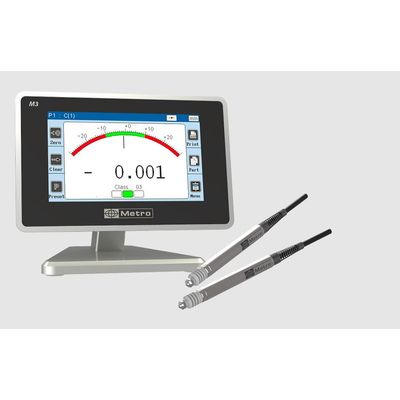
M3 - 2 Inductive Probes Display
The M3 is equipped with a 4.3`` touch screen allowing a very clear visualization of the dimensions as well as a simplified configuration of the device. The M3 has different communication means (USB or RS232) allowing to transmit measurements to a PC and/or to control the display remotely. Its case, machined in a solid aluminum block, offers to the M3 an unequalled robustness, even used in severe industrial environment (cutting oil etc...)
- 2 measurement configurations (2 characteristics)
- Different display modes with 1 or 2 characteristics per screen, with or without tolerances. Static and dynamic measurement (Min, Max, Max-Min, Average, Median)
- Control limits Sorting by classes (up to 16 classes)
- Connection of an optional module with 8 optocoupled inputs/outputs (MB-IO)
- Connection of an optional module with a relay output (MB-RO) to control the actuation of pneumatic inductive probes trough a footswitch or bouton.
- Absolute or relative measurements
- Modbus RTU or ASCII communication
- USB keyboard function when the M3 is connected to a PC (no driver required)
- Automatic change of measurement configuration by sensor movement.
- Possibility to connect an optionnal module for temperature measurement (temperature compensation or alarm on a temperature variation)
- QR code / bar code reader compatible to program the device and easily change the configurations.
- CSV file export on USB Stick including date/time information
- Compatible with the optionnal MB-NET module to generate measurement files on your network.
- Safe and easy to use
Many functions and operating modes can be defined:
Nominal dimension, tolerance limits, control limits, master dimension (reference part).
Choice between 2 measurement configurations (2 characteristics)
Calculation formula (C1, C2, -C1, -C2, C1+C2, C1-C2, -C1+C2, -C1-C2, 3-point diameter)
Calibration
Direct or dynamic measurement (Min, Max, Max-Min, Average and Median)
Relative or absolute mode
Single or multi-range display mode (2 bar graphs) with or without tolerances
Sorting by classes, up to 16 classes
Locking of some functions with hiding of buttons for a simplified user interface
Temperature compensation or temperature variation alarm (option through the MB-TP module)
Network export through the MB-NET module (option)
Q-DAS compatible with RS232
Display resolution (2 to 5 decimal places)
Metric (mm or µm) or inch measurements
M-Bus connector to connect a box with 8 optocoupled inputs/outputs (good part, bad part, calibration etc...)
Automatic dimension change by detection of sensor movements
Choice of language for the user interface
USB keyboard function
The M3 is equipped with a mini-USB connector with 2 functions:
Power supply via a wall transformer supplied.
Measurement transmission: When the M3 is connected in USB to a PC, it is detected as a keyboard with the standard drivers of your operating system (Windows, MacOS, Linux...). When you transfer measurements from the M3, they appear on your computer screen as if they had been entered on the keyboard. No need to install any specific driver or software.
Advantages of this feature
- No risk of error when entering values
- Saves time
- Works everywhere on all softwares : Excel, SAP, Word...
- RS 232 interface
A serial interface RS 232 allows the transmission of measurements as well as the remote control of all the functions of the M3 thanks to ASCII commands or the MODBUS-RTU protocol. It is compatible with Q-DAS
- Graphical interface
One of the advantages of the M3 is its ease of use and configuration. This is made possible by its touch screen and user-friendly graphical interface.