Zebra - Model ZD Series -Thermal Transfer Label Printers
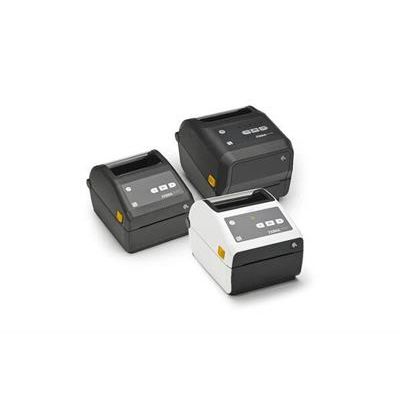
Zebra is well known for their high performance thermal transfer label printers—The ZD Series brings that same quality, durability and usability to the lab. Sleek, compact and user friendly in its design, Zebra’s ZD Series features 3 models, each with a unique set of features to meet the needs and budgets of a variety of labs.
The key to its success is its simplicity—Zebra desktop series printers are incredibly easy to use with straightforward interfaces, the least complicated reloading system on the market and painless integration into existing software, systems and workflows.
Compact Design
This small foot-print printer fits easily on a desktop and leaves plenty of space on the work bench for any other tasks it might be needed for. The small size of the ZD also allows for easy transport and storage of printers for as needed use.
Multiple Communication Methods
The ZD series offers a variety of communication methods, some standard and others optional. This ensures easy integration into your current operation and the ability to integrate further as your facility grows.
- RS-232 auto-sensing serial interface
- DB-9 (standard)
- USB V2.0, bi-directional (standard)
- Centronics Parallel (standard)
- Ethernet- 10/100 internal (standard)
- Wireless- Dual radio 802.11a/b/g/n
- Bluetooth 3.0 (optional)
Media Compatibility
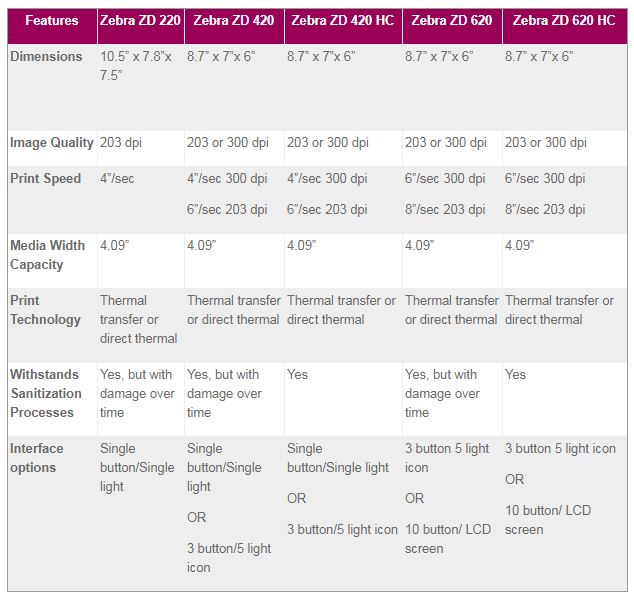
The ZD series offers print width capacities of up to 4.09 inches, perfect for most laboratory applications. All models in this series also feature a moveable sensor to accommodate smaller media widths and a variety of print marking systems.
Optional Cutter and Peeler
All three models offer the option to add an additional peeler for label dispensing. This optional peel-and-present feature increases application speeds and reduces effort required in the labeling process. Some facilities prefer to utilize a printer with a cutter instead, which is available on both the ZD 420 and ZD 620.
Interface Options
Between the three models a range of interface options are available, from the incredibly minimalistic single button and single LED light interface that comes standard on the 220 and the 420, to the 10 button interface on the 620 that additionally features a small LCD screen. The range of options allows you to choose which interface will be the most useful in your facility.
- Simplify operations with user-friendly interface options
- Increase throughput with high speed printing
- Ensure accuracy with high quality and durable thermal transfer print technology
- Utilize space efficiently with a compact design
- Make the best choice for your facility with the ability to choose from 3 different base models and a variety of optional features that can be added to each