

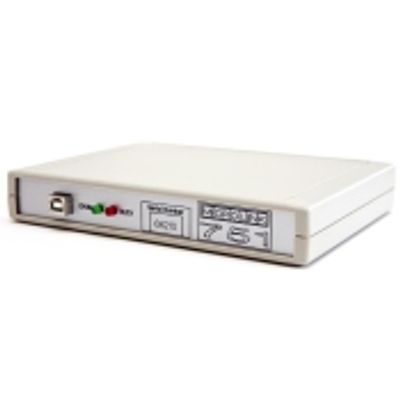
Microlink - Model 751 -USB Data Acquisition and Control System
751 Multi-function USB Data Acquisition with Windmill Software: 16 analogue inputs, 32 digital i/o, 8 counters. Data acquisition and control via the PC`s USB port complete with fully featured Windmill Software and free technical support for life.
- Measure temperature, strain, pressure, voltage and current through 16 analogue input channels
- Switch up to 32 digital outputs
- Monitor up to 32 digital inputs
- Count events with up to 8 counters
- Chop, change and mix configurations
- Includes the powerful yet easy-to-use Windmill 7 Software for Windows: no programming required
- Powered from the PC
- Low power consumption
- Connect up to eight 751s to one PC, giving 128 analogue inputs and 256 digital inputs and outputs
- Choice of four analogue input ranges, selected with Windmill software individually for each channel
- Alternatively, choose automatic ranging and let the software match the input signal as closely as possible
- Integrating analogue-to-digital converter reduces electrical noise
- Use Windmill software to select the resolution of the A-D converter (from 12- to 18-bits): choose high throughput or high resolution
- Automatic recalibration
- Comprehensive User Manual
- Free technical support for life
- Money-back guarantee if not completely satisfied
The 751 provides 32 digital I/O lines, arranged in four groups of 8. Use Windmill to choose whether each group is an input or an output. You can read or set the state of each line individually, or switch several lines at the same time.
Counters
The 751 has eight 16-bit totalling counters. Each counter starts at zero and counts pulses to a maximum of 65535. You can reset a counter at any time from Windmill software. You can use the counters in two modes: accumulating count and resetting count. In accumulating count the counter keeps counting until you reset it. In resetting count the counter shows the number of pulses since the last reading.
You can scale counts using Windmill software. For example if the pulses came from a flow meter which produced one pulse for every 50 millilitres, a scale factor of 0.05 would give a reading in litres.
The counters are found on 8 of the digital input and output lines. You can use any of these you don`t need for counting as normal digital inputs: the counts are always maintained even if you don`t plan to use them.
Signal Connections
The slim 751 offers pin connections for your signals. However, if you prefer to use screw-terminals these are provided by adding one of the 59x Series of units. For analogue voltages, digital I/O and counters, choose the 590unit. This allows many extra facilities, such as:
- contact closure inputs
- higher voltage inputs than normal
- input protection from high voltages
- external current source switching
- output protection
For current, thermocouples, strain gauges and presssure transducers - choose the Microlink 590-8A, 593, and 594respectively.
Measuring Temperature
Depending on your transducers, you might need extra hardware units to make your connections. For example, for thermocouples you will need a 593 box which provides cold junction measurement. (When monitoring thermocouples it is essential that the system knows the temperature of one of the thermocouple junctions. Housing this junction in the Microlink 593 isothermal box keeps the temperature constant, and a cold junction sensor in the box tells the system the temperature. You connect the thermocouple wires to screw terminals in the 593 isothermal box, and connect the terminals to the 751 unit with a ribbon cable. The 593 also detects broken thermocouple leads for you.)
Measuring Strain and Pressure
For strain add a 594 unit. This lets you monitor strain gauge bridges and balanced bridges such as pressure transducers. You can configure individual channels to accept any of these inputs:
- voltage
- quarter bridge: single strain gauge
- half bridge: tensile + compressive strain gauge
- half bridge: normal + transverse strain gauge
- full bridge: 2 tensile + 2 compressive gauges
- full bridge: 2 normal + 2 transverse gauges
- full bridge: tensile normal + compressive normal + tensile transverse + compressive transverse gauge
Measuring Current
For current add a 590-8A to your shopping cart. This has many extra facilities, including:
- contact closure inputs
- higher voltage inputs than normal
- input protection from high voltages
- external current source switching
- output protection
Measuring pH
For pH add a pH-box to your shopping cart. This lets you monitor 12 pH electrodes