


- Home
- Companies
- Bridge Diagnostics, Inc
- Products
- BDI - Model STS4-4 - Wireless ...
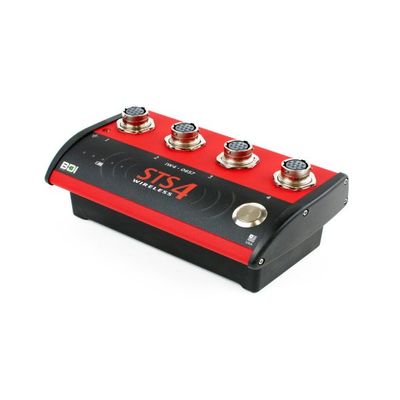
BDI - Model STS4-4 -Wireless Intelliducer Node
The STS4-4-IW3 is a rugged 4-channel wireless data acquisition, DAQ, node typically used for diagnostic live-load testing projects. The long battery life and ruggedized design makes this hardware ideal for use in harsh field conditions.
We have always developed our STS hardware based on 30+ years of field-testing experience as well as feedback from all of our clients around the world. Because we’ve slogged through the mud, rappelled from ropes, and swayed in bucket trucks—all in bad weather—we know that ease-of-use is a must. The software is simple to operate, and the built-in sensor verification routines ensure you’ll collect quality data. With the significant cost associated with field work, the STS4 will pay for itself after just a few uses compared to traditional data acquisition systems.
We have always developed our STS hardware based on 30+ years of field-testing experience as well as feedback from all of our clients around the world. Because we’ve slogged through the mud, rappelled from ropes, and swayed in bucket trucks—all in bad weather—we know that ease-of-use is a must. The software is simple to operate, and the built-in sensor verification routines ensure you’ll collect quality data. With the significant cost associated with field work, the STS4 will pay for itself after just a few uses compared to traditional data acquisition systems.
- A completely wireless turnkey load testing system
- All sensors automatically identify themselves—no tracking channel numbers!
- Hardwired backup communication capability in case of extremely noisy environment
- Capable of reading virtually any analog sensor
Intelliducer sensors, standard wireless communication, simple yet powerful software makes this data acquisition system truly plug-and-play!
- Setup the STS4 Wireless Base Station to create the wireless network.
- Connect your PC to the STS wireless network and launch STS-LIVE
- Plug in the sensors and turn on the the STS Nodes
- Start collecting and viewing data in engineering units