


Picodas Group Inc. / AG-NAV Inc.
- Home
- Companies
- Picodas Group Inc. / AG-NAV Inc.
- Software
- AgNavLink - Transfer Files Wirelessly ...
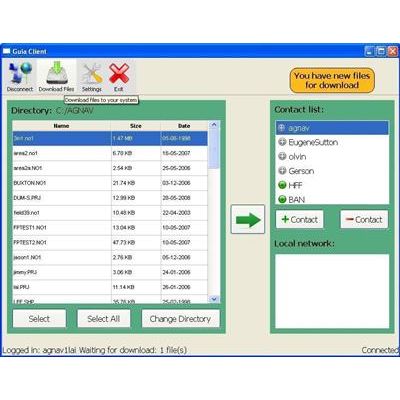
AgNavLink - Transfer Files Wirelessly Software
Leave the USB key at the office. AG-NAV Inc. has proudly introduced the AgNavLink to all AG-NAV customers. Through wireless file transfer and communication, AgNavLink is used to link all people who work on the same job together. These can be pilots equipped with the Guia Platinum, applicators, GIS personel, clients, contractors, and inspectors. The best part is, AG-NAV is offering AgNavLink free of charge.
- Go to the website: http://guia.agnav.com:9004/account.php to register your AgNav Link account. You will get an email confirming your account was created.
- Download the AgNav Link installation. To download now, click here.
- Unzip the AgnavLinknnn.zip file, where “nnn” is the version number.
- Run AgnavLinkInstall.exe to install AgNav Link into your computer.
- Add to the Contact List the persons you want to send data to. If you want to send data to AG-NAV, add to the list “Chrisp” for Chris Plante, “Jasonc” for Jason Corbin, “LaiAgnav” for Lai Nguyen. Before sending data, please enter a message for us to know what you want us to do. Also enter your name and email address for us to reply to you with results and/or comments.
- Click “Change Directory” then select where your data is. You can select the USB key.
- Highlight the person in the Contact List who you want to send data to.
- Click the arrow button to send data.
- If someone sent you data, you will be notified to download the data.
- When all done, click the “X” button to close the AgNav Link.
Note that AgNav Link only transfers files created by AgNav products or for AgNav products. When you select to transfer an area or project, all related data will be sent.