


AgWare, Inc.
- Home
- Companies & Suppliers
- Downloads
AgWare - Version DataLog -Rural Appraisal Software
FromAgWare, Inc.
AgWare has rural appraisal software consisting of two integrated components: DataLog, the database for managing and analyzing comparable sales. ClickForms, the appraisal report generator that features the Uniform Agricultural Appraisal Report (UAAR) and the Uniform Country Residential Report (UCRR®) formats, narrative-style word processing, and more than 300 forms.
Most popular related searches
DataLog Overview
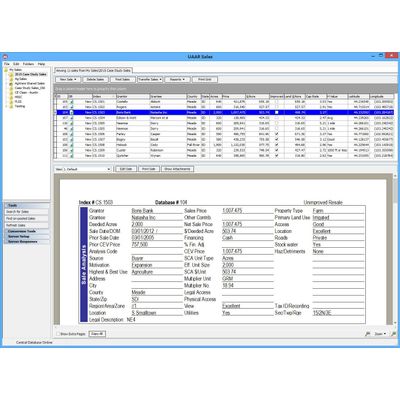
DataLog is a database for storing and managing comparable sales that can be transferred into any of the AgWare ClickForms report formats. Several tools for analyzing sales data are available. A DataLog window is seen in the image below.
Primary Features and Functions of DataLog
- A standardized sale sheet is composed of several sections. Sale data need be entered only once in DataLog.
- Sale Analysis
- Land Mix Analysis
- Income Analysis
- Improvements Analysis
- Comments
- Photo Pages
- Attachments (maps, exhibits, documents, images)
- Use data from unimproved sales to estimate residual value for buildings.
- Up to 20 improvements can be expanded separately and analyzed for depreciation.
- Document the time trend analysis of sales with prior transfers by using the time adjustment tool.
- Five standard summary reports for analyzing ranges in values include:
- Land Value Range
- Improvement Value Range
- Depreciation Analysis
- Property Type Analysis
- Sales Register Summary
- Create individual photo and detailed exhibit pages (sample seen below) that with the sale into a report.
- Primary Features and Functions of DataLog
- A standardized sale sheet is composed of several sections. Sale data need be entered only once in DataLog.
- Sale Analysis
- Land Mix Analysis
- Income Analysis
- Improvements Analysis
- Comments
- Photo Pages
- Attachments (maps, exhibits, documents, images)
- Use data from unimproved sales to estimate residual value for buildings.
- Up to 20 improvements can be expanded separately and analyzed for depreciation.
- Document the time trend analysis of sales with prior transfers by using the time adjustment tool.
- Five standard summary reports for analyzing ranges in values include:
- Land Value Range
- Improvement Value Range
- Depreciation Analysis
- Property Type Analysis
- Sales Register Summary
- Create individual photo and detailed exhibit pages (sample seen below) that with the sale into a report.