


Avatour - 360° Virtual Collaboration Platform
Avatour is a 360-degree virtual collaboration platform designed to enhance real-time remote interaction by providing comprehensive visibility that traditional videoconferencing cannot match. The platform is structured with three primary components: on-site capture using portable 360° cameras, a cloud service that offers high-resolution content with seamless bandwidth management, and a 360° workspace facilitating global participation. Users can join via a standard web browser, VR headset, or immersive room to access live or recorded sessions. Avatour's robust feature set includes dynamic stabilization for consistent viewpoints, high-quality image extraction with annotations, and geospatial capture to record the geographic context of meetings. It also supports a secondary camera for detailed inspections and offers a unique spotlight selector for real-time highlights. These capabilities are essential for sectors such as architecture, construction, manufacturing, and logistics that require immersive, context-rich virtual communication. The system is designed for ease of deployment and use, allowing quick setup and enabling effective decision-making and collaboration.
Experience true 360° visibility that traditional videoconferencing can't match. Remotely visit any site in real time, with the full context you need for effective collaboration and decision-making.
Avatour comprises three components: on-site capture, our cloud service, and our 360° workspace.
On-Site Capture
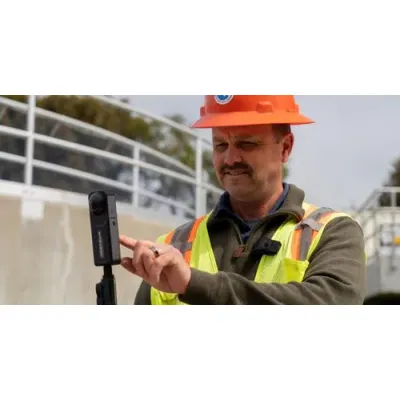
Deploy portable, easy-to-use 360° cameras to capture live and recorded content directly from facility or field.
Cloud Service
Our worldwide network delivers high-res 360° content with dynamic bandwidth management and sub-second latency.
360° Workspace
Up to 20 users can join from anywhere in the world via web browser, VR headset, or immersive room, and collaborate using live or recorded content.
From setup to collaboration, Avatour is quick to deploy and easy to use.
Set Up the Camera
Get one of our curated Avatour hardware kits, or bring your own compatible 360° camera.
Mount on a portable tripod or body mount, and connect to any Bluetooth device for audio. The Avatour software is ready to capture with just a couple of clicks.
Capture Everything!
Start an Avatour live session, or use QuickCapture to easily record 360° video for future review. Either way, you'll capture the entire scene to share with remote viewers. Dynamic stabilization maintains a consistent point of view, no matter how you orient the camera.
Connect and Collaborate
Up to 20 remote participants can join live sessions or view recordings, providing input and making decisions in real time. Advanced features including annotation, deep linking, and reporting, make it easy to share information, context, and decisions asynchronously.
Unlike standard video collaboration tools, Avatour was designed from the ground up for sharing physical context. Explore Avatour's unique features by clicking below.
Live 360° Recording
Record 360° videoconferences directly to the cloud, available to be revisited at any time.
Photos and Annotations
Extract high-quality 2D and 360° images, and add notes directly on the video timeline, all shareable via a simple URL.
Spotlight selector
Highlight areas of interest in real time with our patent-pending Spotlight tool, providing visual guidance for the on-site camera operator.
Secondary Camera
Add a secondary, high-resolution 2D camera feed for detailed views, perfect for inspections where close-ups are needed.
Geospatial Capture
Capture geographic locations of captures as well as meeting participants, providing crucial context and enhancing data integrity.
Built for On-Site Meetings
Click, Drag, Zoom | 360° View
Each participant can look around independently, seeing what they want to see, not just what the camera operator chooses to show.
Snapshots and Video Notes
Input Notes directly onto 360° videos, or on Snapshots, and discuss in comment threads. Turn a live or recorded walkthrough directly into a punch list of action items!
Share a link directly to a Note to invite colleagues to literally see your point of view.
Geospatial Capture
Workspaces
They serve as shareable containers for your assets – 360° videos, images, and documents – and manage access to ensure only the right people can access them.
Set up a separate workspace for each site, each client, each team, or any number of other applications.
Live and Offline ML/AI Processing
Virtual Reality Compatibility
Meetings can be joined via VR headsets, and other devices simultaneously, to provide a flexible collaboration experience.
Secondary Camera
The secondary camera feed can display along with a live 360° video stream or by itself.
Guest Point-of-View Indicators
White, circular indicators will show you where other remote participants are looking in the 360° field of view.
Spotlight
Remote users can "point" or highlight a specific area of interest within the 360° environment.The camera operator and other remote users will then see the area of interest highlighted by an orange, circular indicator.
Quick Capture
Record and upload 360° video and photos directly from the camera to the Avatour platform in a few simple steps.
Webinar Mode
For marketing and sales presentations, Webinar Mode allows you to invite spectators to join a live 360° meeting without webcam or audio participation.
Efficiency Estimates
Track travel cost savings, time savings, and Co2 reduction numbers in your Host dashboard.
Asset & Screen Sharing
Share your screen, as well as pre-loaded cloud assets (360 videos, images, etc) in your Avatour meeting -- perfect for checklists, training videos, and more.