- Home
- Companies
- BinMaster Sensors and Technologies LLC
- Software
- BinMaster - Version CementView - Cloud ...
BinMaster - Version CementView -Cloud Inventory Management Software
Make monitoring inventory in silos and storage tanks a faster, safer, and less tedious task. Cloud-based software tailored to cement plants that makes it easy to monitor material stored in silos, reduce material shortages, and keep production moving.
CementView® is a Cloud application and SaaS inventory system for on-site or remote inventory monitoring of solids, slurries, or liquids used to make cement. It measures storage silos and tanks using BinMaster continuous level sensors as well as other sensor brands with a 4 -20 mA analog output or Modbus RTU.
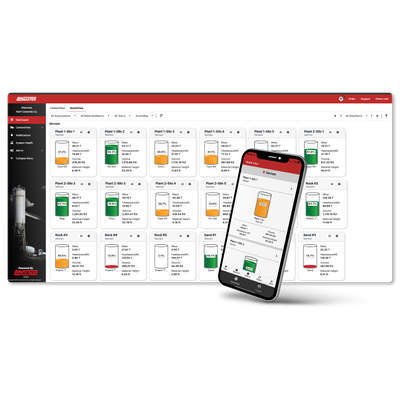
Featuring automated alerts and a real-time inventory data display, CementView makes it easy to manage multiple vessels at multiple plants on an inventory management dashboard. CementView has an intuitive user interface optimized for both desktop and mobile devices.
CementView keeps inventory data safe and secure. Administrator controls let you specify user privileges, allow multiple users, suppliers, or vendors to access information—and protect against unauthorized changes to the system.
Dispatchers and drivers love it
- Know how many truckloads of a given material will fit in a silo
- Improve visibility of inventory for central dispatch
- Eliminate climbing silos and dropping tape measures
- Optimize scheduling for raw and finished materials
- Visibility of multiple locations to optimize delivery routing
- Streamline logistics between the cement plant, batch plants, and suppliers
Makes plants more efficient
- Remote monitoring via phone, tablet, or PC
- 24/7 monitoring anywhere there`s internet access
- Accurate silo level measurements update automatically
- Highly scalable for multiple vessels or multiple locations
- Eliminates manual monitoring to save time and enhance safety
- Historical reporting optimizes purchasing and logistics
The app keeps you informed
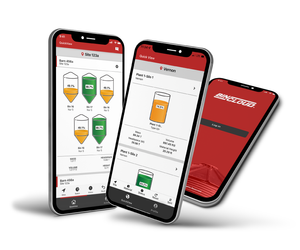
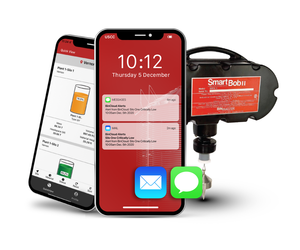
Loaded on your phone, drivers can access the BinCloud app for QuickViews of the inventory in silos they are filling. The app is free with the CementView subscription and is available from the App Store or Google Play.
Essential information made safe and simple
- Eliminates manual monitoring to save time and enhance safety
- Remote or on-site monitoring via phone, tablet, or PC
- 24/7 monitoring anywhere there’s internet access
- Accurate, reliable silo information updates automatically
- Automated alerts via email or text message
- Historical reporting to optimize purchasing and logistics
Continuous level sensors that work with CementView
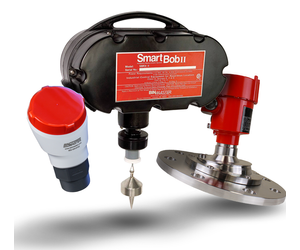
- SmartBob II
- 3DLevelScanner (3D Solids Scanner)
- NCR-80, NCR-84, NCR-25, or NCR-30 80 GHz non-contact radar
- All CNCR 80 GHz compact non-contact radars
- GWR-2000 or GWR-3000 guided wave radar
- SPL-200, FVL-200, or LL-100 laser level sensors
- Ultrasonic sensors used for liquid level measurement
- Sensors of most any brand with 4-20 mA output or Modbus RT
Network devices streamline your system
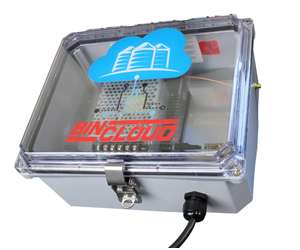
- Gateways to provide connectivity to an IP network or your control room
- Long-range transceivers to transmit data up to a mile away
- Analog expansion hubs to upgrade an existing system to the Cloud
- HART consolidator modules to daisy-chain multiple HART sensors
CementView`s user interface is intuitive and easy to learn
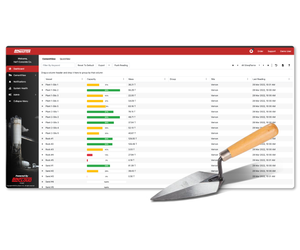
Customize your inventory dashboard selecting which columns are displayed and save views for future use. Instructions are built into the UI — displayed by hovering over an information icon.
To prevent data loss, popup warnings help ensure information is not unintentionally deleted. User access to specific information can be controlled to prevent unauthorized or unneeded changes from happening.
The BinCloud app is optimized for use while in the field. Vessel, location, gateway, and account pages are simplified for quick viewing.
The power of QuickView
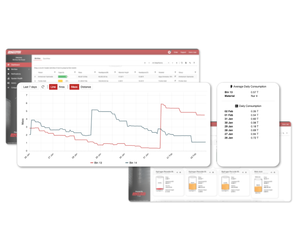
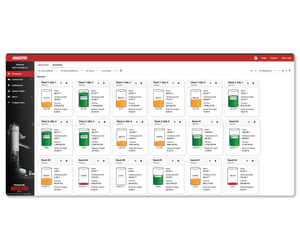
View your vessels in this clean, easy-to-understand graphical interface. Data refreshes every five minutes! See the vessel name or number, percentage full, location, material, vessel status, and the date and time the data was last refreshed. Filter to see only the vessels you need by alert status, material, or location.
Get push-button reports
- Current tank readings or tank history
- All locations or a particular location
- Sort by vessel, material, or alert status
- Set readings as distance to product, percent full, or volume
- Specify date ranges to view usage trends over time