


- Home
- Companies
- BIS Safety Software - Canada
- Software
- BIS - Training Record Management System
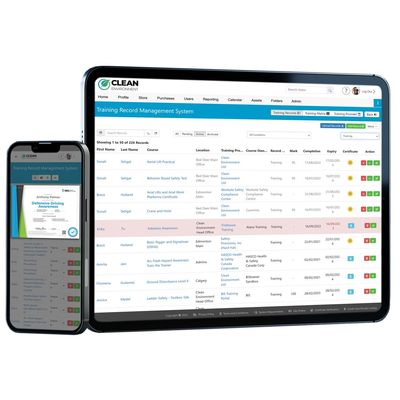
BIS - Training Record Management System
Maintaining employee and contractor training records can be an automated process, with very little admin work. Imagine a system that can scan and save a whole company’s training documents, and even remind employees when they need to renew. That’s the magic of a TRMS. Whether it’s 20 employees, or 20,000, it automates the whole process.
Never worry about training compliance again! This system stores, tracks and organizes:
- Online Courses
- Instructor-Led Courses
- Historical Certificates
After you and your team have uploaded your files, the system can send expiry warnings straight to your team members wherever they are. Furthermore, it makes compliance a breeze, a couple of clicks can give you or anyone you allow a full picture of your teams’ training.
Fed up with the hassle of locating training records? Annoyed by the scattered storage of records and certificates? We have the perfect solution.
Our online software for managing training records not only keeps track of and organizes records and certificates for courses completed via our learning management system (LMS), but it also securely stores, monitors, and generates reports for training conducted in classrooms, on-site, or through other systems!
With our user-friendly Excel upload feature, you can effortlessly create numerous user accounts and upload thousands of training records within minutes. Once uploaded, you have the flexibility to sort records by first name, last name, course title, training provider, completion date, or expiry date. Additionally, you can conveniently attach copies of training certificates to each corresponding training record.
Automated Expiry Notifications
Our automated system sends notifications to make sure your employees always stay up-to-date with their training. We send email reminders to supervisors, employees, and administrators 90, 60, and 30 days before the training expires, allowing them to refresh their knowledge before it becomes overdue!
You can also check expiring course notifications with:
Click the links below to learn more about our Digital Forms and Folders, request a free demo, or access the feature sheet.
- Training record management database
- Dashboard Reporting
- Excel Reporting
- User Profiles