


- Home
- Companies
- Trinity Consultants
- Software
- BREEZE AERSCREEN - Air Screening Model
BREEZE AERSCREEN - Air Screening Model
BREEZE AERSCREEN is a screening model based on the U.S. EPA AERMOD air quality dispersion model and is compatible with the BREEZE AERMOD modeling system. It will produce estimates of “worst-case” 1-hour concentrations for a single source, without the need for hourly meteorological data. BREEZE AERSCREEN also includes conversion factors to estimate “worst-case” 3-hour, 8-hour, 24-hour, and annual concentrations. These concentration estimates are intended to be equal to or greater than the estimates produced by AERMOD with a fully developed set of meteorological and terrain data, however the degree of conservatism will vary depending on the application.
What`s New in AERSCREEN Version 1.8
- Incorporates the latest U.S. EPA AERSCREEN executable 16216, released on January 17, 2017, including enhancements for adjusting surface friction velocity option
- Incorporates the latest U.S. EPA MAKEMET executable 16216
- Incorporates the latest U.S. EPA AERMOD executable 16216r, released on January 17, 2017
- Continued support for earlier AERMOD executables
Key Features
- Models a single source: point/stack (vertical, horizontal, capped), area (rectangular, circular), volume, flare
- Automates receptor arrays
- Automates BPIP model setup, execution, and importing
- Calculates maximum 1-hour concentration at each modeled receptor
- Conversion factors to estimate “worst-case” 3-hour, 8-hour, 24-hour, and annual concentrations
Basic Features
- Models single or multiple buildings
- Measures in English or Metric units
- Enhanced runtime display
- Diagnoses scenarios with IntelliClick
- Receives visual alerts during model setup displaying message severity (error vs. warning)
- Built-in “smart” file naming so users never overwrite results again
- Compatible files for post-processing and plotting high values in BREEZE 3D Analyst
- Exports tabular results to Microsoft Excel format
- Exports charts to .bmp, .jpg, or .png formats
Model Setup and Execution
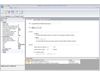
BREEZE AERSCREEN is a simple to use, intuitive screening air quality modeling system designed to streamline the setup, execution, and analysis of a model scenario without the complications associated with data entry via a DOS comand prompt window. There are only a few steps that need to be completed to setup, execute and analyze model results. Also, all of the model setup is done in a series of data entry tabs or in a model properties panel.
Data Entry Forms
The data entry forms contain options and parameters associated with the various AERSCREEN data blocks. Setup of the various input files is done automatically and execution of the various Fortran programs (e.g., AERMOD, BPIPRM, AERMET) is seamless, streamlining the entire process and virtually eliminating the potential for costly errors.
Scenario and Model Properties
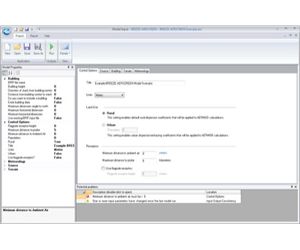
In addition to the data entry forms, BREEZE AERSCREEN allows for scenario settings to be set in a "Properties" panel. The Properties panel organizes data logically and displays all options in a single view. This panel is also dockable meaning that you can detach it from the main window and move it to where it is most convenient for you. When the panel is "docked", it can also be set to auto-hide.
Diagnostics and Problem Prevention
A diagnostics panel displays informational messages, warnings, and errors alerting users to potential problems with your scenario. Each message is preceded by a visual indicator to identify the severity of the alert. While informational and warning messages will not necessarily prevent a scenario from successfully completing, error messages indicate that if the run is executed, it will fail. Clicking on a message will take the user to the location within the application that trigged the message.
Meteorology
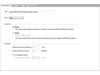
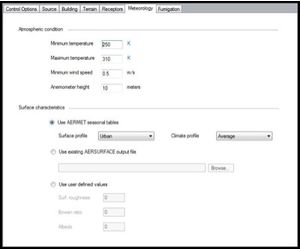
Entering meteorological data into BREEZE AERSCREEN takes only a matter of seconds. Users can quickly and efficiently enter values for the atmospheric conditions. In addition, users can use AERMET seasonal tables, upload an existing AERSURFACE output file, or use user-defined values for the surface characteristics.
BREEZE AERSCREEN is used to conduct first level screening analyses to predict worst-case concentrations from a single source in simple or complex terrain. The program includes a built-in matrix of worst-case meteorological conditions or the user can input a specific meteorological condition.
Additional Meteorology FeaturesUses model generated, hourly meteorological data and users have the ability to set bounds on meteorological conditions. Surface characteristics can be user defined, selected from lookup tables, or imported from an AERSURFACE file.
Sources and Receptors
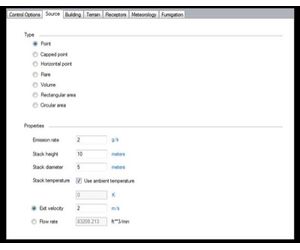
In BREEZE AERSCREEN, information on the source and receptors are entered in the respective tabs. For the source, users have the option to choose from a variety of source types and customize the properties accordingly. The receptors may be customized as well, giving the option of using flagpole receptors should users choose. A unit conversion option is also available when entering discrete receptor distances, making it easy to alternate between different units.
BREEZE AERSCREEN models a single source. Users have the option to choose between a point/stack (vertical, horizontal, capped), area (rectangular, circular), volume, or flare source.

Receptors
A receptor grid can be automatically generated or discretely defined to identify maximum concentrations. Receptor locations may be ground level or above ground level.

Building Effects
BREEZE AERSCREEN gives users the option to include a building in their model run. If users select this option, they can easily enter the different dimensions of the building, or upload an existing BPIP input file. When a building is included in AERSCREEN, the program will seamlessly and automatically calculate the impact of air flow over and around the building on the pollutant plume exiting the source.
With BREEZE AERSCREEN, users have the option between single or multiple building mode. For multiple buildings, an imported BPIP file is used. Automated BPIP model setup, execution, and importation is included in BREEZE AERSCREEN.

Charts and Tables
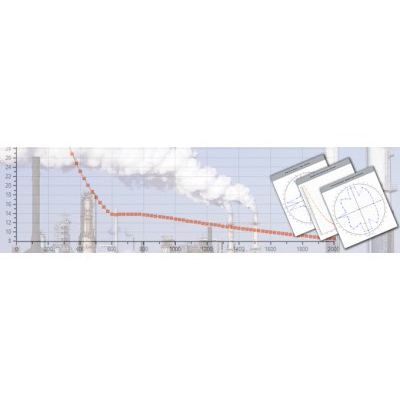
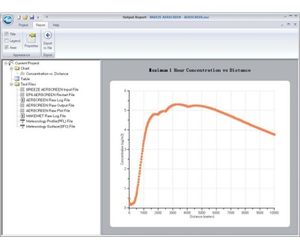
BREEZE AERSCREEN provides extensive graphical and tabular results options to facilitate both analysis and documentation. The results from each model run can be displayed in three different formats: chart, table, and text file.

Multiple Charting Options
After a model run, BREEZE AERSCREEN will create a variety of charts of the modeled concentrations. These charts include a concentration vs distance line graph, a flow sector analysis of the concentration, and a flow sector analysis of the impact distance.
Hardware
- Intel or AMD processor, 32 or 64 bit. 500-megahertz (Mhz) or higher
- 256 megabytes (MB) RAM, 512 MB RAM recommended
- 500 Megabytes (MB) available disk space
- 1024 x 768 minimum display resolution
- Mouse or other pointing devices
Software
- Windows 10, Windows 8, Windows 7, Windows Vista, Windows Server 2008 or Windows Server 2012
- Microsoft .NET Framework 4.0 or later
Additional Requirements
- None