

Simplify3D - Build Preparation Software
The ultimate tool for additive manufacturing with powerful features and intelligent automation to help with each step of the 3D printing workflow.
Simplify3D has been producing industry-leading additive manufacturing software for more than a decade. Trust the product built with professionals in mind instead of relying on freeware, untested, or unsupported tools.
Simplify3D provides complete control over the 3D printing process in ways that competitors can’t match. Customizable support structures, variable part settings, targeted customizations, and a unique process system unlock new capabilities for your 3D printer.
We do the testing so you don’t have to! Our in-house labs contain one of the largest collections of different 3D printers in the world. We continually test and evaluate the software to make sure it delivers exceptional results right from the start.
Simplify3D boasts best-in-class performance with novel algorithms that are many times faster than the competition. Save time during processing, iterate faster, and push the limits of complexity with your designs.
The software is seamlessly integrated with more than 600 different 3D printers from hundreds of popular OEM brands. Our universal approach eliminates the need to learn a new software program for each printer you purchase in the future.
Connect directly with our team of 3D printing experts if you encounter any questions. We are constantly printing using the same machines as our customers, allowing us to understand the nuances of each printer so we can help you maximize your results.
Efficiently import 3D model files and analyze the geometry for potential mesh errors that could impact the print. A powerful geometric engine gives you the capacity to handle massive multi-gigabyte files with tens of millions of triangles so that there are no limits to the complexity you can create. Detect and fix common issues including holes, thin walls, or self-intersections that would otherwise create significant problems during printing.
Move your models into the ideal printing position with best-in-class tools for orienting, arranging, and packing. Optimize build efficiency by nesting hundreds of parts on a single build platform, or interactively manipulate a single part to find the perfect orientation for improved print quality. Common issues such as out-of-bounds geometry or incorrectly positioned parts are automatically identified to prevent costly failures.
Patented support structure capabilities offer superior results with an unprecedented level of control. Automatically generate support structures with fine-tuned parameters, or completely customize support location and shape using rapid editing tools. Upon print completion, the sacrificial supports effortlessly separate from the final part with such impressive results, you have to try it to believe it!
The difference between a good print and a great print comes from the level of control you have over the printing process. Simplify3D offers extensive control capabilities far beyond other applications. Our unique process system enables streamlined settings customization for specific parts or regions within a single part. Intelligent software algorithms dynamically adjust common parameters including layer thickness or infill density throughout the print to reduce material usage without compromising our industry-leading build quality.
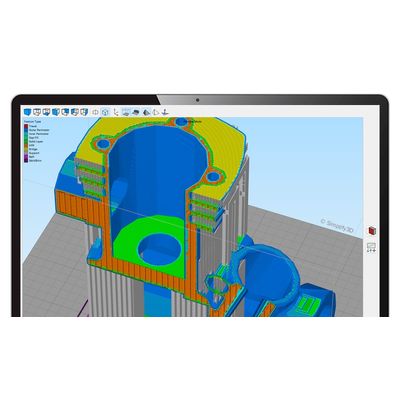
More than a decade of research and development has led to one of the fastest and most capable slicing engines ever designed. Precise machine-specific instructions are generated while incorporating complex real-world physics to optimize the quality and strength of each part. Build files are verified using our advanced Preview Mode which offers an incredibly realistic view of the exact size, speed, and properties of each additive instruction – generating valuable insights about the printing process before it even begins.
Simplify3D directly communicates with hundreds of popular 3D printers, allowing you to control and monitor your machines using USB, WiFi, or Ethernet connections. Initiate a new print or track important sensor readings from the comfort of your desktop. Perform critical maintenance tasks with ease using a robust machine interface that is customized for the capabilities of each unique printer.
Adaptive Layer Height
The software optimizes the thickness of each layer based on the model topology to improve surface quality and reduce print time.
Variable Part Settings
Our unique process system enables you to define different settings for specific regions of a single part, giving you complete design freedom.
Automatic Seam Hiding
Intelligent logic selects the ideal start points on each layer, hiding unsightly seams and defects to ensure the highest quality surface finish.
Dynamic Extrusion Sizing
Unique logic dynamically adjusts the size of each extrusion to perfectly recreate thin features with improved accuracy and strength.
Custom Support Shapes
Easily define custom shapes for support structures to provide the perfect foundation while avoiding unnecessary surface defects.
Dynamic Infill Density
The density of the interior fill can be automatically increased near the surface to create a strong exterior while reducing overall material usage.
Small Feature Reinforcement
Intelligent algorithms automatically identify and reinforce small features to improve part strength for fragile regions.
Automatic Mesh Repair
Many common mesh errors are repaired automatically in real-time during slicing, saving valuable time when dealing with imperfect models.
Powerful Scripting Engine
An integrated scripting engine makes it easy to insert custom commands, modify existing sequences, or customize output files for new applications.
Windows
Windows 7 or later
Both 32 and 64-bit installers are available
Mac OS
Mac OS 10.13 or later
Intel and Apple Silicon processors are both supported
Linux
Ubuntu, Debian, and Fedora-based distributions are all supported
64-bit processor is required
Recommended Distribution: Ubuntu 20.04 LTS or later
Easily switch between any of the following languages
- English
- French
- German
- Italian
- Japanese
- Spanish
- Portuguese
Recommended Requirements
2.3 GHz or faster processor with 4 or more cores
8 GB or more of RAM
Minimum Requirements
1.7 GHz or faster processor with 2 or more cores
4 GB or more of RAM
OpenGL 2.0 capable system
1 GB of available hard disk space
3D Models: stl, obj, 3mf
Build Files: gcode, x3g, g, gx, g3drem, 3w, makerbot, bfb, hsv
The following license types are available for purchase
- Standard License
- Floating License
- Offline License
An internet connection is required for standard and floating licenses types