


Cablo
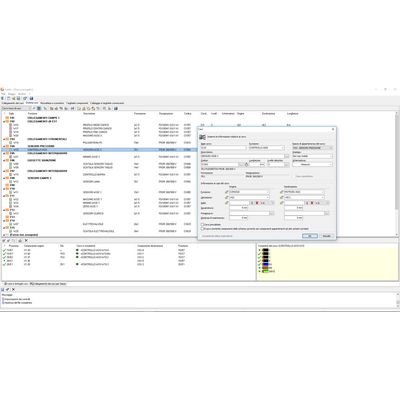
Managing cables connection, wiring lists and automatic panel routing. Cablo manages the definition of the connecting cables, the wiring among the terminal blocks and other elements of the system, and then the separate cables, the wiring list, the list of identifiers of wires, cables, components or clamp terminals. Cablo directly interfaces with Electro Graphics software for designing electrical diagrams by acquiring the data processed for the representation of terminal blocks. In terminal block management, you can make changes, add auxiliary elements, and then draw them into the drawing. Moreover, Cablo interfaces with software for printing wire and equipment labels.
Job order
Job order management, network projects sharing, backup and recovery.
Management of user profiles for conditional access to the common database and library.
Terminal boards
Managing plug-in bridges system on multiple levels.
Managing accessories (separators, endings, etc..).
Editing and ordering terminals and automatic diagram update.
Function for the automatic completion of a terminal block to which a cable is connected.
Automatic panel routing
Automatic processing the wires route inside the panel, according to the component shapes and cable conduits designed in CAD (requires CADelet or iDEA).
Connection between distinct panels or between panels and boards.
Processing the optimized sequence of wiring of panel, according to the best route.
Check of the saturation of the conduits inside panel and labeling.
Exporting cabling data and calculated lengths to a generic spreadsheet in order to interface directly with wire cutting-stripping-crimping machines.
Direct interfacing to Makfil System and CAD Cabel.
Wiring list and table
Managing wiring list, identifying each wire of connection between the terminals of the various equipment in the diagram.
Assigning information about designation, colour and section of the wires.
Assigning wire and terminal labels to component labels.
Automatic assigning of the sequence of connection to each wire of the diagram, wire length and type of the terminal, in order to obtain the connection table.
Wiring table, to true identification of serial and parallel
connections where provided for, to wire without error, ensuring the reproduction of the prototype of connection diagram.
Managing cable lugs, with customizable categories.
Labels database
Definition of labels type for wire and equipment: this data will be used during the markers generation by the specialised software compatible.
Possibility of customize the database by the user.
Wires and equipments exportation
Data file exporting for interfacing directly with the leading software for printing wire labels or equipments plates.
Setup of exported information: wire, sequence, mark, upstream and downstream element, according to standard CEI 16-1 and CEI EN 62491 about identification of connections.
Data file exported format: Grafoplast (Simplo98, Simplo2000 e SI2000), Modernotecnica, Weidmuller (M-Print), Brady, Cembre (Doctor Plot, Genius and GeniusPro), Cabur (Marking Pro), Phoenix Contact (Clip Project), Morsettitalia (Script@mi) and KMI.
Interfacing with Autodesk Inventor for exporting the list of links.
Cables database
Database with more than 11.000 cables complete of technical data (formation, typology,
sections, weights, bending rays and identification of conductors with numbers or colours).
User can customize the database.
Cables bundle
Defining and managing cables bundles.
Correlation of bundles with the interconnection diagram in CAD.
Check of consistency between interconnection diagram and wiring diagram.
Connecting cables
Generating cables list with assignment of mark, function, reference terminal board, noise level, shielding type and length (linked to the cables database).
Automatic acquisition of cable list from topological definition or from previous projects.
Connecting cables to a support terminal block or directly to components, by direct selection or by pointing to elements on the drawing.
Marking of connections to match the cable and simultaneous checking of cable saturation (used wires in the cable) and other incoerences within the connection.
Detailed representation of cables with connectors or connected to terminal blocks.
Bill of cables
Summary table of cables which highlights the different types of cable used in the project and the length of cable used for each type.
Printouts and exporting
Preview and printout of cable laying table, cable list, bill of cables, terminal list, cabling list and wiring table.
Any report can be exported as an ASCII file, XLS, CSV, HTML, RTF, or WMF.
Any report can be saved as PDF and add to existing PDF document in order to obtain a single PDF summary of project documentation (drawings, diagrams, reports,...).
Unicode UTF-8 translation in different language of all text in the work.
Drawing of cables laying table and terminals table in CADelet and iDEA.
Minimum system requirements to install and use Cablo.
- Computer with 3 GHz o higher processor.
- At least 8 GB RAM.
- Hard Disk with at least 6 GB free space.
- Colour video and graphics board (SVGA or higher).
- USB, mouse, printer or plotter.
- 64-bit Windows 7 SP1, 10 or 11.