- Home
- Companies
- Evident Scientific
- Software
- Evident - Version cellSens - Clinical ...

Evident - Version cellSens -Clinical Imaging Software
Providing intuitive operations and a seamless workflow, cellSens software’s user interface is customizable so you control the layout. Offered in a range of packages, cellSens software provides a variety of features optimized for your specific imaging needs. Its Graphic Experiment Manager and Well Navigator features facilitate 5D image acquisition. Achieve improved resolution through TruSight™ deconvolution and share your images using Conference Mode.
Details
- Software Downloads:
The Olympus cellSens platform gives you full control over the display and placement of icons, toolbars, and controls, enabling the software to grow and adapt to meet your evolving research needs.
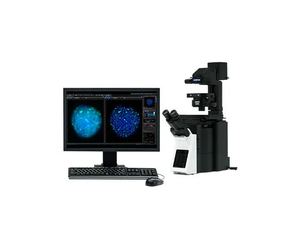
cellSens Entry is the ideal stepping stone for researchers wanting to move into digital image acquisition and documentation, providing all the tools needed for simple image acquisition.
The Olympus cellSens Standard takes acquisition beyond a single image, with advanced image capture processes (e.g. time lapse) and control of motorized and encoded microscope components.
The most versatile member of the Olympus cellSens family is cellSens Dimension, featuring fully automated image acquisition, powerful analysis tools, and so much more.
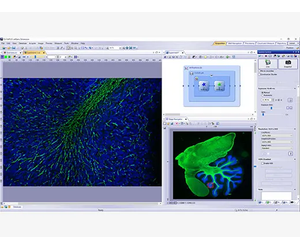
Acquire images in five dimensions using tools, like the Graphic Experiment Manager (GEM) and Well Navigator that help you visualize your data acquisition in a user-friendly way.
Dimension
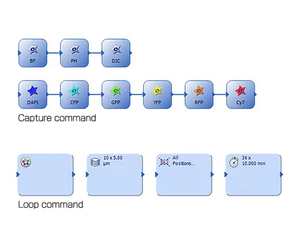
The GEM is a flexible drag-and-drop interface that enables you to build simple or complex experiments within cellSens software. Combine actions within specialized frames to dictate the order and priority of automation and interact with the system during long-term, time-lapse acquisitions without terminating the experiment. To increase efficiency, you can define macro functions, such as executing deconvolution processing in the GEM.
Dimension + Standard
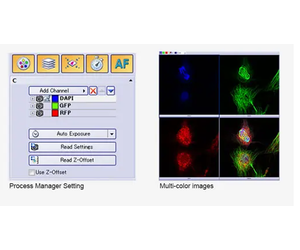
The Process Manager makes it easy to capture multichannel and time-lapse images with just a few clicks. Z-stack imaging is also possible when using a cellSens Dimension license.
Dimension + Multiposition
Standard + Multiposition
Use the optional Multiposition solution to automatically capture multipoint and large-area images when using a motorized stage. You can also navigate around your sample by simply clicking on a point in an image with the Stage Navigation tool.
Dimension + Multiposition + Well Plate Navigator
The Well Plate Navigator automatically scans and acquires images from standard and customized well plate formats. All acquired images, sample positions, and user comments can be saved into a structured database for rapid centralized access. Apply unique multidimensional acquisition settings to a single well or multiple selected wells in one step, so you can execute multiple experiments within a well plate in support of complex experiments.

Dimension + Database Core or Database Client
Standard + Database Core or Database Client
The Database Core solution enables you to create user-defined databases with full access control, which can be shared across a network. An interactive query tool makes it easy to find the desired images, associated image properties, user comments, and all related files, like spreadsheets, with automatic preview of the found images. With the Database Client solution, you can conveniently read and write to the shared database from many different stations.
Dimension + Multiposition + Well Navigator +
Database Core or Database Client
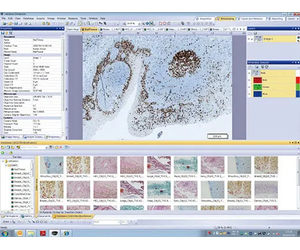
When used with the Well Navigator solution, the Database solution makes viewing and analyzing well plate images with a large amount of data more efficient. Simply click on icons for image information, such as the date, file name, or well plate number, and any selection of captured images can be viewed for further analysis. Together, these tools enable you to view captured images and continuously analyze selected images (using Batch Macro commands) using the well plate interface.
Dimension
Standard + Manual Process
Create stitched images in real time with the Manual Process solution. Manual Process Control makes it simple to move around your sample using a manual stage while the software records and stitches the images in real time, providing a cost-effective alternative to whole slide imaging.
Dimension + Multiposition
Standard + Multiposition
With cellSens Dimension, and a motorized stage, large-area image acquisition is fully automated with the optional Multiposition solution. When combined with a motorized Z or focus maintenance device, like TruFocus, this function can correct for the effects of sample distortion and tilting.
Dimension
Standard + Manual Process
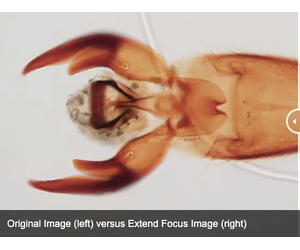
Create a single in-focus image from successive image planes as you turn the focus knob using the Extended Focus Imaging (EFI) function. A motorized focus drive fully automates EFI acquisition. EFI composite images can also be created directly from previously captured Z-stacks.
Dimension
By automatically capturing many images at different exposures the HDR function creates a final image with a higher dynamic range than could be achieved on a single exposure. Low-intensity signals are clearly visible without overexposing the bright areas of the sample.

Reveal the true data in your images with TruSight deconvolution and other image processing techniques. Easily share your results with others using Conference Mode or drag and drop data into preconfigured reports.
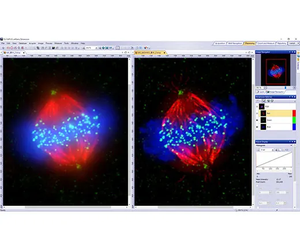
Powerful TruSight Deconvolution
Cell line: Human cervical cancer cell line (HeLa)*1
Immunostaining: Hec1 staining (green, Alexa Fluor-488), a-tubulin staining (red, Alexa Fluor-568), DAPI staining (blue)
Mitotic HeLa cell derived from human cervical cancer. Mitotic spindle and kinetochores are stained with anti-a-tubulin (red) and anti-Hec1 (green) antibodies, respectively. Chromosomes interact with microtubules constituting mitotic spindle via kinetochores, protein structure assembled on centromere region of chromosomes.
Image data courtesy of: Department of Molecular Oncology, Institute of Development, Aging, and Cancer, Tohoku University Masanori, Ikeda and Kozo Tanaka
Dimension
cellSens Dimension includes live 2D deblurring for image preview and acquisition to enable better focusing on thick specimens.
Dimension + CI Deconvolution
The Constrained Iterative Deconvolution solution has the latest algorithms for improved resolution, contrast, and dynamic range with industry-leading speed through GPU processing. Algorithms designed specifically for use with FV3000 and Olympus Super Resolution (OSR) images provide clearer, sharper images from high-end systems utilizing ultrafast frame rates and high sensitivities.
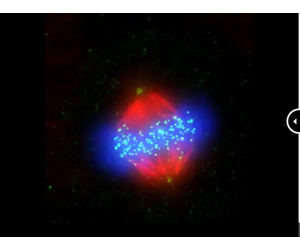
Dimension
Objectively determine the best focus from multidimensional images, including Z-stack and time-lapses, using the Best Focus Extraction tool. This tool is effective in creating T-series images with the best focus possible.
Visualize three-dimensional data in a single plane using maximum intensity projections, which combine Z-series planes into a single image with the brightest pixels all in view.
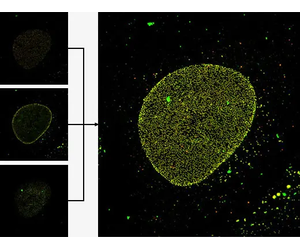
Dimension
Standard
Use Conference Mode to fill the screen with live or static images for presentation and collaboration. Graphic annotation tools are available at your fingertips for image markup without the need to exit Conference Mode, improving workflow efficiency and saving time.
Dimension + NetCam
Standard + NetCam
Using standard TCP/IP protocols, the cellSens NetCam Solution facilitates the transfer of live, as well as stored, images throughout a network for teaching, mentoring or supervision. As a result, even when outside of the laboratory, colleagues and/or supervisors can monitor the work from any point on the network, improving the efficiency of the laboratory.
Dimension
Standard
Display images side-by-side for accurate comparison with simultaneous zooming and movement for faster image processing.
Dimension
Tile View mode enables you to view multidimensional datasets all at once, making fine movements or events easier to identify.
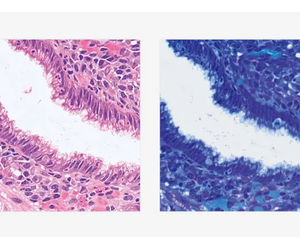
Dimension
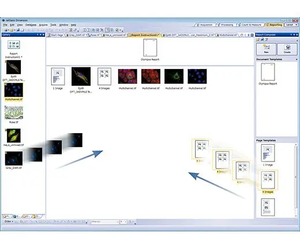
A convenient Reporting tool combines images and measurement metadata into a report template with easy drag-and-drop operation. These Microsoft Word*2 reports enable you to quickly and easily collaborate with colleagues and communicate results.
*2 Requires Microsoft Word version 2010 or later
Dimension
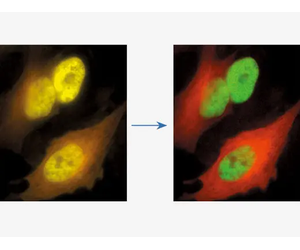
With the linear unmixing algorithm in cellSens Dimension, fluorochromes that overlap in their emission spectra—such as GFP and YFP—can be readily separated to produce crosstalk-free fluorescence images. This linear unmixing tool can also separate autofluorescence-related background signals.
*1 Although it became one of the most important cell lines in medical research, it’s imperative that we recognize Henrietta Lacks’ contribution to science happened without her consent. This injustice, while leading to key discoveries in immunology, infectious disease, and cancer, also raised important conversations about privacy, ethics, and consent in medicine.
To learn more about the life of Henrietta Lacks and her contribution to modern medicine, click here.
http://henriettalacksfoundation.org/
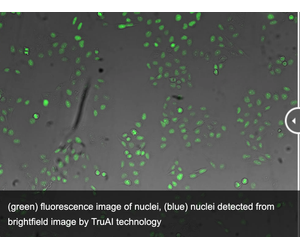
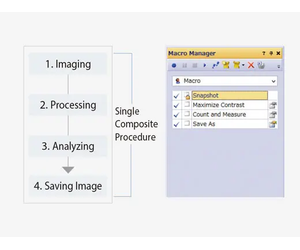
Dynamically work with your images to extract the most data for the reliable experimental results. The software’s deep-learning technology (TruAI) offers improved segmentation analysis. Use theMacro Managerto automate entire workflows all the way through image analysis and saving.
green: You can see that the detection accuracy is low due to unevenness of GFP label.
blue: Detecting the nuclei with high accuracy despite scratches and dust on vessel.
Dimension + Deep Learning
Standard + Deep Learning
Experience the benefits of cellSens software’s deep learning technology to improve your image analysis. From automatic segmentation of complex morphologies without hand labeling to segmentation of cells or organelles using a simple transmitted light image, deep-learning technology offers improved speed and efficiency without the phototoxicity of fluorescence.
Dimension
Standard + Count and Measure
Efficient and precise threshold-based object detection for automated nuclei counting and classification are available. Conveniently export your results to Microsoft Excel for additional analysis.
Dimension + Count and Measure
Standard + Count and Measure
Expand on the extensive manual measurements already available in cellSens software with the Count & Measure module. Easily perform automatic object measurement and classification in an interactive interface where recognized objects are always linked with their measurements.
Dimension + Count and Measure + Deep Learning
Standard + Count and Measure + Deep Learning
Improve your count and measurement by detecting objects with Deep Learning.

Live Cell Solutions
Dimension
Standard + Confluency Checker
Olympus’ cell identification algorithm enables you to measure cell count and confluency on phase contrast images, including data averaging and total cell count estimation. A cell growth curve can be output by measuring along with time series.
Dimension + Count & Measure + Tracking
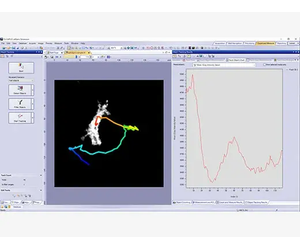
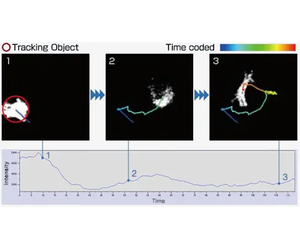
cellSens software`s Object Tracking solution provides a powerful and intuitive tool to quantify dynamic processes such as cell movement and division. Moving objects can be automatically detected, tracked, and analyzed over time.
Dimension
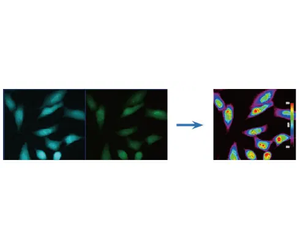
Graphically depict intensity and ratio values defined by regions of interest (ROIs) and adjust ROI placement to compensate for cell movement. Convert intensity variations to hue and brightness using intensity modulated display (IMD) to visually enhance the fine structures often found within ratio or FRET images.
Dimension + Ratio/ FRET or Life Science Analysis
The Ratio/FRET solution is used to display and analyze real-time ratiometric imaging data. FRET analysis of both sensitized emission and acceptor photobleaching is supported in this user-friendly workflow.
Dimension + Life Science Analysis
The Photo-Manipulation Solution can be used for curve-fitting analysis of FRAP images.
Dimension
Save time and clicks by using the macro manager to automate typical acquisition and data analysis workflows. Batch Macro commands can be applied to multiple images simultaneously and can reduce the time required to complete complex image acquisition and analysis.
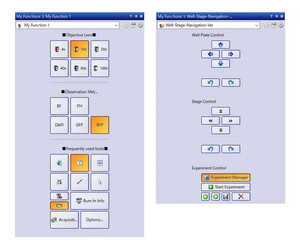
Choose a recommended layout for image acquisition and analysis or create your own using theMy Functionstool set.
Dimension
Standard
Novice and expert users will simultaneously benefit from the Simple Layout, an interface designed for a clinical research workflow.
- Acquire, annotate, share, and save your images using the intuitive Smooth Control tool window.
- Built-in measurement tools display only when required, reducing software clutter and minimizing distraction.
More complicated experiments benefit from premade layouts where all common functions are integrated into tabs, combining related options and settings. Layout tabs make it easy to select functions according to the workflow. For example, camera control features are displayed under the Acquisition tab, but are hidden when you switch to the Processing tab in the next stage.
Dimension
Standard
Tools and windows can be organized to suit the job at hand, optimizing the layout’s functionality. This enables you to spend less time training and more time imaging.
You can create and save custom toolbars for frequently used functions and save them to the My Functions window, where they can be used to improve efficiency when working with your most commonly used tools.

Dimension
Standard
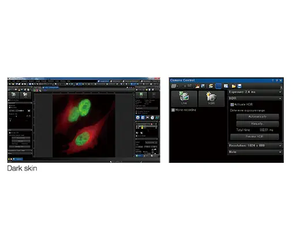
The Dark Application Skin reduces computer monitor-generated ambient light, helping you adapt to darkened environments, like those required when imaging samples with fluorescence. Icon contrast remains high for easy recognition and quick selection.
The cellSens software package is not for clinical diagnostic use.