Capture - Cloud Software
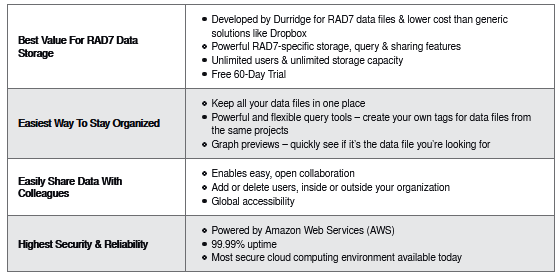
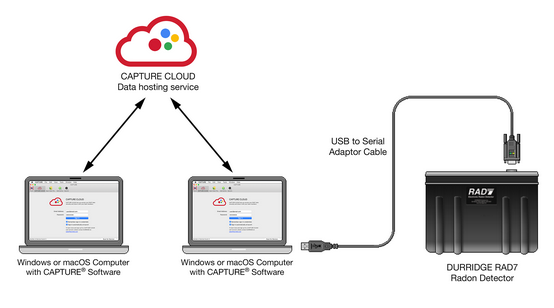
CAPTURE CLOUD offers secure storage for RAD7 data files and makes it easy to organize, analyze, and share data with your colleagues.All users can browse RAD7 data files and issue queries to search for record sets by several criteria such as date range, organization, RAD7 device, and others. Users can be easily added or deleted at any time. When a data file is selected from the list of results, a preview appears immediately. The data can then be analyzed and edited using CAPTURE software. Any modifications made to the data file can be saved to disk or back to the CAPTURE CLOUD server.
CAPTURE CLOUD Browser
Navigate your radon data with the CAPTURE CLOUD Browser, which is seamlessly integrated into DURRIDGE CAPTURE software for Windows and macOS.
- CAPTURE`s Main Window Toolbar provides quick access to the the CAPTURE CLOUD Browser.
Search for data by File Type, Organization, Device, Date Range, Name, Description, and Data Tags.
Custom Data Tags can be included in a search query to limit the results to a particular location, team, project, and more.
The search results can be sorted by Name, Date, and more. Double-clicking an item opens it in a new Graph Window. - When a data file is selected in the list of search results, its details appear in the right section of the CAPTURE CLOUD Browser.
- Edit the selected file`s Name and Description, and assign custom Data Tags to make it easy to find. Data tags can specify locations, teams, projects, and more.
- A graph image shows a preview of the selected data file. Double-click on the graph to open it in a new window.
- Share data files with anyone that has a CAPTURE CLOUD account.