


Spheryx xSight - Compliant Software Suite for Holographic Characterization
The xSight Compliant Software Suite is a specialized software platform designed for total holographic characterization, ensuring high-quality data compliance aligned with FDA standards as specified in 21 CFR Part 11. Key features include an intuitive Admin Console, which enables administrators to easily manage user roles and statuses, facilitating customization to align with various operational environments. The suite also incorporates a robust Audit Trail capability, allowing for comprehensive tracking and review of user actions over specific periods. This feature supports detailed searches and export functions for enhanced auditing. The software suite is suited for laboratories and industries that require meticulous compliance and tracking of digital signatures and electronic records in their operations.
xSight Compliant Software Suite for Total Holographic Characterization provides quality and compliance at the highest level and enables implementation consistent with all of the FDA requirements of 21 CFR Part 11.
Features of the Compliant Software Suite include:
- Usernames and passwords managed by Windows Active Directory
- Unique user IDs are ensured by using Windows user IDs for authentication, eliminating the need for an additional user ID and password.
- Password expiration compatibility based on the use of Windows user IDs eliminates the need to separately manage password expiration.
- Data integrity assurance
- User roles that can be customized to meet your needs
- Automated reporting
- Audit trail time-stamped with user and role information and fully exportable
- Audit trail searchable and customizable over multiple parameters
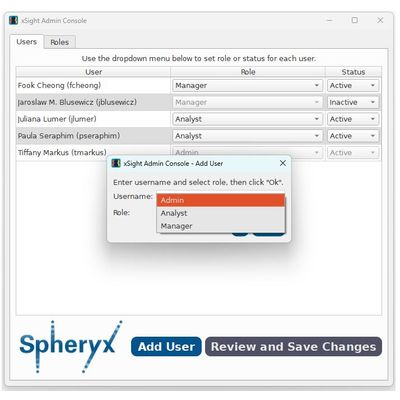
The xSight Admin Console is a user-friendly interface that allows Admin Users to add users, define their roles and classify them as “active” or “inactive”.
The Admin/Manager logs into the xSight Admin Console and clicks the “Add Users” button. In the popup window the Admin/Manager enters Windows AD username and selects a role.
Dropdown menus allow the Admin to change a role for each new user and to select their status as “Active” or “Inactive”. Once set, the user roles can be changed by the Admin/Manager as well.
User roles can be customized to meet the needs of your operating environment. To view the tasks of a particular role, the Admin/Manager selects the “Roles” tab. Each task is listed under this tab and whether the role has permission to perform each task.
The Admin/Manager has the ability to edit the permissions for each role and to add custom roles.
A complete Audit Trail can be viewed with the xSight Audit Trail Viewer. The audit trail is searchable over multiple parameters and can be exported at any point.
An example of an audit trail is shown below, showing a variety of actions by a user on a specific date with a full view of the information that is recorded for each action.
An expanded view of the first several columns of an audit trail is below, showing the various actions taken by three different users over a three day period.
The Audit Trail can be viewed using filters for multiparameter searches to focus on specific areas of interest. In the example below the audit trail above has been filtered to show the action “login” over the dates from February 14-16, 2024.