


TAL - Version WinWedge -Data Collection Software
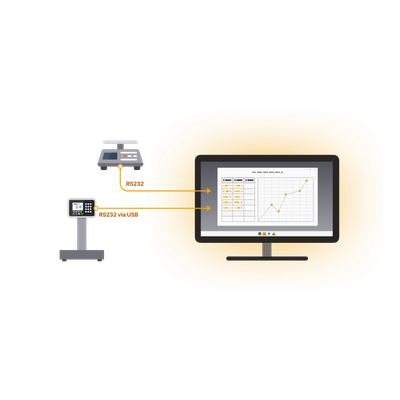
WinWedge software inputs data from any RS232, USB or Ethernet output device (including scales and balances) directly into Excel, or any Windows application. It can also transmit prompts or commands to control your instruments.
Automated Data Collection
Eliminate manual data entry and streamline your data collection process. Send commands to control your devices on timed intervals, or with keyboard shortcuts or onscreen buttons.
Advanced Parsing & Formatting
Only collect the data that you need with powerful data parsing capabilities. Tailor your data to fit your destination application or form with our precise formatting and filtering settings.
Highly Configurable & Flexible
WinWedge is used across many industries. It supports thousands of devices and connection methods including serial, USB (via RS232), Bluetooth (via virtual COM port), and local networks (TCP/IP).
Industry-tested Accuracy & Reliability
Device data is automatically transferred to your Windows application with 100% accuracy. Perfect for process control, quality control, pharmaceutical and other “mission critical” data.
WinWedge Features
WinWedge easily collects data from balances, scales, gages, meters, gages, sensors, and measuring devices and laboratory instruments.
Designed to be highly flexible, WinWedge can easily parse, filter and format your device data before inputting the data into any of your Windows applications. In other words, WinWedge is an easily customizable serial I/O device driver.
- WinWedge comes in both Standard and Professional versions.
- See All Standard vs. Pro Features
- Wondering how WinWedge can help with your data transfer and automation needs?
- Contact sales
- Compatible Devices
WinWedge Standard collects data from serial, RS232, and RS232-via-USB professional instruments.
WinWedge Standard collects data from serial, RS232, and RS232-via-USB professional instruments.
- Balances and Scales
- Meters
- Gauges
- Calipers
- Sensors
WinWedge Pro is compatible with a wider range of devices than WinWedge Standard. It supports devices with longer and more complex data output, network/Ethernet-connected devices, and RS232 and USB devices. WinWedge Pro also offers more control options and can handle binary, hexadecimal, and ASCII output.
- Connect your device to the COM port on your PC and select the communications parameters (i.e. baud rate) in WinWedge.
- Easy, walk-through menus allow you to tailor the data to your needs by splitting the data into fields, filtering the data and formatting. Setup output strings to send to your device if needed.
- Activate WinWedge and watch the data from your serial devices “pop” into the Windows application you select, such as Excel (shown here). You can even input the device data directly to graphs or do real-time analysis on it.