


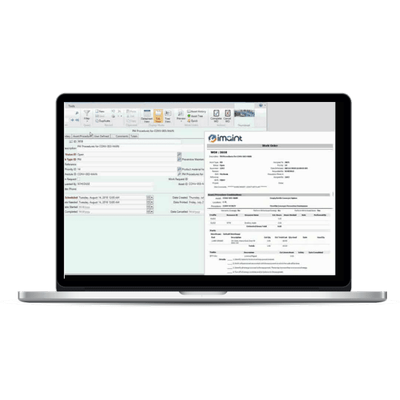
DPSI - Work Order Management Software
One vital aspect of an effective CMMS software package is work order management capabilities. Particularly with multi-site companies, the ability to have accurate inventory levels tied to the needs of a given asset and its potential upcoming maintenance is vital. A well-developed work order management software package will also allow an organization to adequately forecast planned maintenance work orders, while allowing for unplanned work orders as well. This software will additionally schedule the completion of work orders in alignment with programmed priorities, in order to preserve operating capacity with minimal impact to the completion of customer expectations.
A top-of-line CMMS package combines the capabilities of maintenance and management. This includes ensuring probability-based availability of repair and spare parts to facilitate the completion of any scheduled or unplanned maintenance work order.
Work order maintenance management software will do more than ensure parts are available. The costs of each individual part will be maintained, and reporting can be run at any level of detail required, ranging from cost centers to general ledger accounts to the costs associated with a specific part in one warehouse. Maintenance scheduling should be available by time or meter, based on priorities and valid days. Schedules should auto-generate and print as needed, including all necessary drawings, pictures, documents, procedures, and safety instructions for the accurate completion of the work order.
Bottom line – fully functioning work order maintenance management software gives an organization the insight needed to understand the impact of every asset and every current and future repair, at any time.
Assigning type to work orders can help you track the type of labor performed, determine work priorities, and assign a criticality rating to each piece of equipment. Gathering and analyzing data about work order type enables you to determine whether it’s best to replace or to repair a piece of equipment. For example, if a maintenance manager looks back on work orders and finds that a number of unexpected repairs have been performed on a particular asset, he or she may determine that it would be best to replace the asset. Below are the main types of work orders used in a CMMS.
A general work order is any planned or unplanned maintenance task that isn’t considered a preventive maintenance, inspection, emergency, or corrective maintenance task. General work orders may include tasks like setting up or dismantling equipment, painting walls, or changing a light bulb, for example.
An inspection work order allows a maintenance technician to audit or inspect an asset based on a predetermined set of parameters. Inspections are usually time-based and associated with a specific schedule. During an inspection, any identified problems can be corrected with the creation of a new work order. Inspection work orders may be an important part of the audit trail for the asset.
A preventive maintenance work order handles any scheduled routine maintenance tasks performed on individual assets or groups of assets. Preventive maintenance is performed to prevent deterioration or failure on existing equipment in order to extend its lifespan. Preventive work orders define resource requirements, instructions, checklists, and notes for each task.
Preventive work orders should be associated with a schedule to ensure that the maintenance task is performed at a specific time interval, such as every 180 days, or in the case of fleet maintenance, after a set number of miles. Any equipment that is essential for your organization should be included in your preventive work order schedule in order to provide continuous production
An emergency work order is generated when an asset breakdown occurs and needs to be repaired immediately. This type of work order records and tracks any reactive work performed that was not planned. Once the work is complete, it is important that the maintenance technician provide information in the work order about what happened, why the breakdown occurred, what was done about it, and what can be done to prevent it from occurring again, thus adding valuable information to the history of the asset.
A corrective maintenance work order is generated when a maintenance technician discovers a problem while completing a preventive maintenance, inspection, general, or emergency work order. Corrective maintenance is performed to identify, isolate, and rectify a fault so that the equipment, machine, or system can be restored to its best working condition. Unlike an emergency work order, a corrective maintenance work order is planned and scheduled because the problem or issue was identified before a failure occurred. A corrective maintenance work order may cover the repair, restoration, and/or replacement of equipment.
Ideally, maintenance technicians will close work orders 24 hours within completing a job. This will help ensure that the information in the system remains current. It’s essential for maintenance technicians to use CMMS software to record adequate closeout data on work orders. Information about the work performed and lessons learned should become part of your maintenance records.
Best-of-breed work order management software will additionally include safety instructions with the work orders, to increase the safety parameters for the maintenance activities. Further, this software package will ensure and appropriately allocate skilled labor hours to complete the orders, both planned and unplanned.
Technological and mobile advances enhance work order maintenance software by allowing for access to the system for reporting, budgeting, or ad-hoc analyses from any web browser or mobile devices. As such, best-of-breed software packages literally put all the information necessary to manage work order maintenance within arm’s reach, any time of day, from anywhere.
Our CMMS and EAM software automates work order management by streamlining the process from beginning to end. Features include:
- Keep track of labor, parts and miscellaneous maintenance costs
- Estimate and track labor (internal and contract)
- Group multiple assets and procedures together on a single order
- Quickly assign labor hours for faster processing and closing
- Schedule resources for specific work orders
- Graphically show outstanding work for the day, week or month
- Reschedule work orders and assign internal and contract labor with a few clicks of a mouse
- Re-open work orders as necessary to make corrections or add information until the accounting year has been closed
- Perform downtime tracking
- Notifications to employees based on type of work and status