


EEMS - Version EFDC+ Explorer (EE) -Pre- & Post-Processor Software for the Environmental Fluid Dynamics Code
Our Graphical User Interface (GUI), EFDC+ Explorer (EE), was designed with the end user in mind. We knew that making any version of EFDC easier to use would be beneficial to the scientific community, so we created EE to make the EFDC modeling process smoother and more efficient. EE eliminates the need for you, the modeler, to spend hundreds of hours on tedious data input and text file editing. Furthermore, you’ll no longer need an extensive knowledge of programming or a FORTRAN compiler. EE provides an easy, step-by-step process for building a model.
More Efficient
Before EE, if you wanted to create a hydrodynamic model using any version of EFDC, you would need one to two YEARS to create, edit, run, and calibrate a model. Now, with EE’s input tools, computational efficiency, consistency checks, improved processing speeds, and overall usability improvements, you can have a viable complex model in only one to two MONTHS!
10x
Create a model 10x faster!
Fully Supported
Environmental hydrodynamic models are used throughout the world to predict and analyze environmental events, resolve legal disputes, visualize toxic contamination, and provide solutions to intricate scientific problems. With so much at stake, we hold ourselves to a high standard in the maintenance and support of our software. Over the course of the development process, we have improved our modeling system with faster processing speeds, more analysis tools, new sub-models, and bug fixes. With every release, we continue to improve and update our software to meet the community’s needs.
1,000+
Updates and improvements, with more coming!
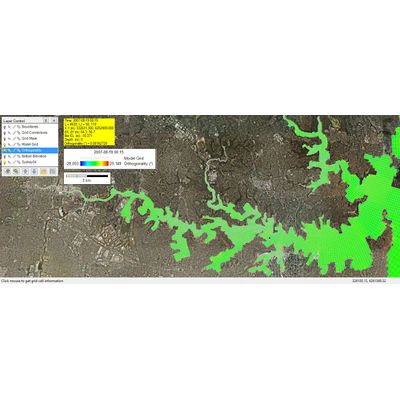
Grid+, EEMS’s curvilinear orthogonal grid generation tool, is designed to create and edit grids for EFDC+, although it also works with any other 2D modeling tool that uses curvilinear grids. EE has been optimized to import Grid+ files and quickly generate an EFDC+ model. Grid+ is replacing CVLGrid as our grid generator.
EE generates Cartesian grids with either uniform grid spacing or variable grid spacing. You can easily generate a rectangular model domain by defining the domain extents and grid interval. A more complex model domain can be specified within EE using a shoreline file. EE’s quick and easy model generation tools enable rapid grid resolution testing during the early stages of model development.
EE is capable of importing complex curvilinear models generated by third-party utilities such as Delft RGFGrid formatted files (i.e., GRD file), Grid95, and SEAGrid, as well as any generic, cell-based nodal coordinate files. This means you can leverage existing work on your project, without having to go back and start from scratch.
EE allows you to quickly import grids from a wide variety of hydrodynamic models such as CH3D-WES, CH3D-IMS, ECOMSED, and prior versions of EFDC. EE can also import grids with multiple sub-domains, including disconnected sub-domains that can be connected using the EFDC+ N/S and/or E/W cell connections.
The fully coupled nature of the EFDC+ model has the great advantage of not requiring external linkage to other sub-models or executable files, therefore simplifying complex simulations. All calculations are undertaken internally in the EFDC+ code, which contains all of the sub-models, including hydrodynamics, wind generated waves, temperature, salinity, dye, sediment transport, toxics, water quality, and more. To make management of this wide range of options easy, EE allows you to turn each module on and off in one location, as shown below. Only when you turn on a given module, the respective options are displayed. This makes it easier to build a model in a logical, step-by-step process, and keeps the GUI orderly and concise.
EE saves you considerable time by automatically initializing EFDC+ parameters and settings with commonly used default parameters. For example, just by turning on the Water Quality sub-model, hundreds of water quality parameters are initialized. You can then modify these as required by the needs of your study.
EE also provides the option to load default parameters from existing models.