


Computers and Structures, Inc.

Version ETABS -Building Analysis and Design Software

SHARE

The innovative and revolutionary new ETABS is the ultimate integrated software package for the structural analysis and design of buildings. 

Most popular related searches

SAPFire® Analysis Engine

CSI Solvers have been tried and tested by the industry for over 45 years. The SAPFire Analysis Engine can support multiple 64-bit solvers for analysis optimization and perform both eigen analysis and Ritz analysis. Parallelization options are available to take advantage of multiple processors.

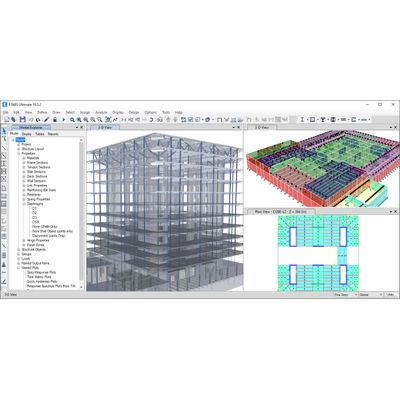
ETABS offers a single user interface to perform modeling, analysis, design, and reporting. There is no limit to the number of model windows, model manipulation views, and data views.

Interactive Database Editing

CSI software stores model data and other information in database tables which may be edited directly through interactive database editing. This powerful feature allows models to be developed or edited quickly.

Utilize Interactive Design Capabilities to Maximize Efficiency

Design of steel frames, concrete frames, concrete slabs, concrete shear walls, composite beams, composite columns and steel joists can be performed based on a variety of US and international design codes.

Design Codes

ETABS offers a wide range of code-based design features for steel frame, concrete frame, cold form steel, and aluminum frame.

Completely Customizable Graphical User Interface

ETABS offers a single user interface to perform modeling, analysis, design, and reporting. There is no limit to the number of model windows, model manipulation views, and data views
Enhanced DirectX Graphics
DirectX graphics with hardware-accelerated graphics allow for navigation of models with fly-throughs and fast rotations
Multiple Views
Users can view moment diagrams, load assignments, deflected shapes, design output and reports all in a single screen
Quick Navigation and Data Management
The ETABS model explorer enhances your ability to manage data in your model. You can define, duplicate, and modify properties in groups and drag-and-drop properties right onto the models for assignment. User-defined displays can be set up easily in the model explorer for quick navigation

Wide array of templates for quick model generation.

ETABS has a wide selection of templates for starting a new model quickly. At this model template stage, you have the ability to define grid and grid spacing, the number of stories, the default structural system sections, default slab and drop panel sections, and uniform loads (specifically dead and live loads)
Physical Model
The physical model is made up of objects that represent the physical structural members. Physical model views accurately display insertion points, member orientations, object intersections, and other geometric details captured by the object model
Analytical Model
Analytical model views display the finite element model of the structure which is made up of the connectivity of the joints, frames, and shells and defined meshing. When the analysis is run, the analytical model is auto-generated from the model and its assignments and settings
Stories
One of the most powerful features that ETABS offers is the recognition of story levels, allowing for the input of building data in a logical and convenient manner. You can define your models on a floor-by-floor, story-by-story basis, analogous to the way a designer works when laying out building drawings
Enhanced Drafting Utilities
Intelligent snaps make model generation simple by detecting intersections, extensions, parallels, and perpendiculars automatically. Easily import an architectural DXF/DWG into the background of the ETABS modeling window and use it as a template to trace over to help you create your model. Turn layers on and off to pick which layer(s) you want to see. You can also right-button click on an element to quickly convert an area into an ETABS structural object.
Multiple Grid System Definition
In ETABS, grids can be defined as Cartesian, cylindrical, or general free-form grid systems. There is no limit to the number of grid systems in a model, and they can be rotated in any direction or placed at any origin within the model
Developed Elevation Feature to Generate Custom Elevations
Developed elevations can elevate any drawn path on a plan view. This is particularly useful for elevating a facade that takes a very unique shape. Once the developed elevation is drawn, it will then be added to the list of elevations in the model
Comprehensive Interactive Database Editing Tool
CSI software stores model data and other information in database tables which may be edited directly through interactive database editing. This powerful feature allows models to be developed or edited quickly
Model Explorer Functionality
The model explorer allows easy access to model definition data, including property forms, load definitions and object forms, as well as analysis and design results in graphical, tabular and report formats
Wide Array of Meshing Tools
Engineers have many options when it comes to mesh generation in ETABS. Simply select the area object and then select the rules for the automatic mesh generator to use. You also have the option to manually mesh objects into the model. This is referred to as external meshing. This results in a one-to-one correspondence between object and elements