
FrostSmart - Fan Monitoring Software
Frost Fan Monitoring is a ‘must’ if you don’t live on-site or you’re running multiple Frost Fans. Alarms can be generated in the form of text messages. Frost Fan status along with tower temperature, engine rpm, battery status, wind speed and trip hours are sent to your Loncel hosted customer-specific website. By far the majority of customers subscribe to FrostSmart™ Monitoring when they purchase a FrostBoss Frost Fan.
All FrostBoss® machines with Auto Start/Stop and wireless radio temperature probes are now monitored (subject to cellular network coverage). That means no additional monitoring hardware costs* – only an annual monitoring fee to access your customer-specific data.
*Hardware costs apply if additional add-on sensors are required eg canopy temperature sensors, weather stations, soil moisture monitors and water flow meters.
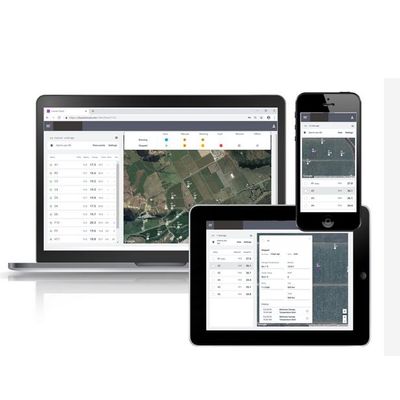
- Your customer-specific website monitoring app can be accessed via any internet-connected device - https://my.frostsmart.com
- Powerful insights – this system can be used to check your Frost Fans are armed and ready before a frost, to check on operation during a frost and to analyse historical data after the frost.
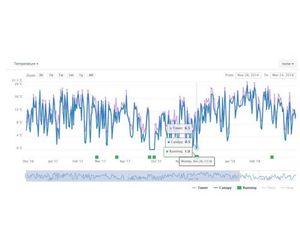
- Data insights – tower temperature, canopy temperature, engine rpm, battery status, wind speed and trip hours.
- Each fan is displayed on a Google map and the data relating to each fan displayed in tabular and graphical form.
- Frost monitoring data from the website is downloadable as a simple Excel spreadsheet.
- Alarms can be configured by the user and sent to multiple contacts, by text message, phone-call or email (eg run signal, canopy temperature). At the start of the season these alarms need to be activated for each site, via the Alarm settings page. Once activated, the alarms will display on the main page against each triggered sensor.
- For important alarms, we recommend you activate notifications. Contacts can be notified by phone, SMS or email. They can then log in to the app to monitor the situations in real-time.
Additional monitoring including other remote canopy temperature sensors, weather stations, soil moisture monitors and water flow meters can easily be added to the Gateway via a dual input.
Right: Example report showing tower probe temperature, canopy temperature and running for an individual machine.