


ITASCA Software
- Home
- Companies
- ITASCA Software
- Software
- FLAC/Slope - Version 8.1 - Graphical ...

FLAC/Slope - Version 8.1 -Graphical Interface Software
FromITASCA Software
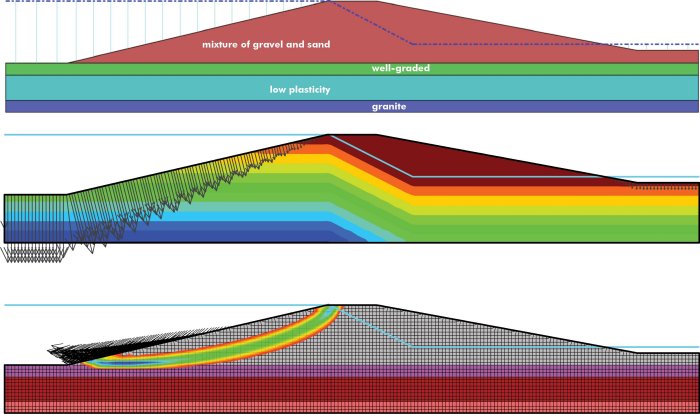
FLAC/Slope is a special, streamlined version of FLAC for evaluating the factor of safety (FoS) of soil and rock slopes in two dimensions with simple and fast model setup and analysis execution. FLAC/Slope can simulate stability problems under a wide variety of slope conditions, including: arbitrary slope geometries, multiple layers, pore pressure conditions, heterogeneous soil properties, surface loading, and structural reinforcement.
Most popular related searches
water table
pore pressure
ground reinforcement
slope stability
rock slope
geotechnical software
geogrid
geosynthetic
geotechnical
security system
- Specialize version of FLAC with a streamlined user interface for evaluating the factor of safety (FoS) of slopes;
- Uses Shear-Strength Reduction (SSR) method to calculate FoS;
- Simple, fast model set-up and analyses execution;
- Wizards for slope, bench, dam, and general topography;
- Include 3D structural ground support (rock bolts, soil nails, and geogrids);
- Include an interface between materials to model geological or artificial surfaces;
- Axisymmetric or plane strain analyses;
- Specify the location of a water table for effective stress analysis;
- Apply forces;
- Specify the materials either manually or from a database;
- Specify geological layers; and
- Plot calculated FoS, velocity vectors, shear strain, and plasticity indicators.
- Now freeware provided at no cost and with no time or size restrictions
- No CPU limits
- Simplified user interface and workflow
- Specifically designed to perform multiple analyses and parametric studies for slope stability projects
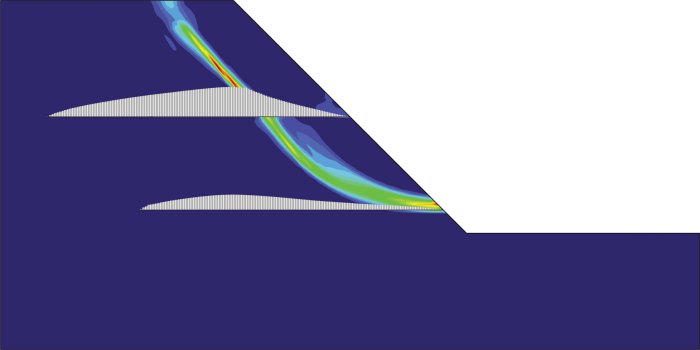
- Failure mode develops naturally – no need to specify a slip surface or failure mechanism
- Predict multiple, interacting failure mechanisms (failures can propagate)
- Structural interaction (e.g., rock bolt, soil nail, or geogrid) is modeled realistically as fully coupled deforming elements, not simply as LEM equivalent forces
- Extensive solution controls and options
- Multi-threaded mechanical calculations
- Built-in PDF manual and example files
- Wizards for generating slope, bench, dam, and general surface grids
- Automatic and customizable meshing tools
- Mohr-Coulomb, Hoek-Brown, and Ubiquitous joint materials are available
- Built-in materials library includes gravel, sand, silt, clay, and rock properties
- Add, save, edit, and import/export your own material properties with the library
- Easily define geotechnical layers
- Automatic boundary conditions
- Apply stresses (Sxx, Sxy, Syy, normal, shear, and pressure) and forces (Fx, Fy)
- Cable structural support elements can be added as geosynthetic sheets or spaced (out-of-plane) ground reinforcement to simulate ground-structure interaction.
- Easily add a water table to include pore pressures for effective stress calculations
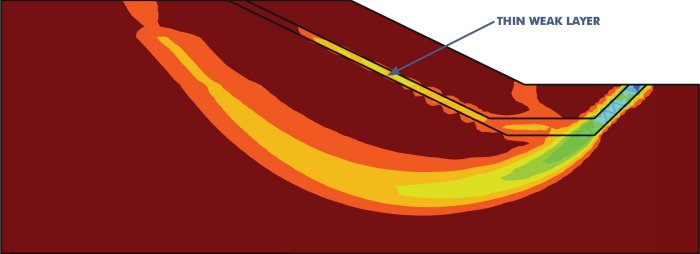
- Add a Mohr-Coulomb interface to represent a weak plane for faults, joints, or artificial boundaries
- User-defined gravity settings
- Plane strain or axisymmetric analysis
- Automatic FoS calculations using the shear strength reduction (SSR) method
- Structural support elements, materials, and interface properties can be included or excluded as part of the FoS calculation
- Exclude model regions from the FoS calculation to capture the global failure
- Pseudostatic analysis with constant horizontal and/or vertical accelerations to represent an earthquake
- FLAC/Slope model records can be saved and imported into FLAC for additional analysis
- Available plot items:
- Materials
- Shear strain rate contouring (failure surface location)
- Velocity vectors (failure mode)
- Pore pressure contouring
- Model boundary or mesh
- Water table
- Applied conditions
- Plasticity indicators (yielding/failure)
- Ubiquitous joint angles
- Ground reinforcement elements and axial forces
- Calculated FoS (in legend)
- Export model plots as bitmap, postscript, and DXF formats
- Generate an HTML report with material, interface, and structural element property tables and solution table
- Optionally show resources to:
- View all of the background FLAC commands generated as you create and run models
- Query the model using FLAC commands
- Compare runs using different parameters, and even compare results from different projects
Recommended System
- Operating System: Windows 8.1 Pro or newer (with the latest service packs installed), 64-bit
- Hard Disk: 1 TB, 7200 rpm or better
- Processor: Intel Core i5 CPU (3 GHz) or better
- Memory (RAM): 16 Gbytes or better (Large models may require more.)
- Video Card: HD graphics card, 1024 x 768 pixels, 32 bit color palette or better
- Ports: 1 USB port is required for the security key
- Operating System: Windows 7 or newer (with the latest service packs installed), 64-bit
- Hard Disk: 500 MB (for full program installation and project space)
- Processor: Dual core CPU (2 GHz)
- Memory (RAM): 1 Gbytes
- Video Card: HD graphics card, 800 x 600 pixels, 32 bit color palette
- Ports: 1 USB port is required for the security key