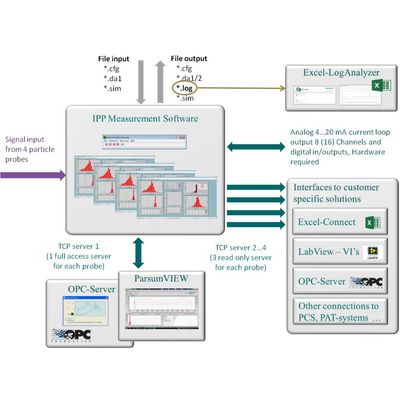
The Parsum measuring software is a flexible and adaptable system of programmes and interfaces. The IPP measuring program itself is the heart of the system. IPP controls the measurement and guarantees a clear presentation of results. The interface can be customised to show only relevant results from a multitude of information.
In addition to the particle size distributions (number and volume distributions Q0, Q3 and q0, q3, as well as sieve fractions), special attention is given to the representation of the progression of attributes such as X10/X50/X90 over time. The display of auxiliary values, such as the particle rate (number of particles measured per second), loading (particle concentration) and particle velocity, provides additional valuable information about the process.
The overview shows the entire measuring system with all additional modules and options for data transfer and evaluation.
The Excel macro LogAnalyzer is used for the quick and intuitive offline evaluation and graphic depiction of measuring processes that have been saved in the measuring software’s automatically generated logger files.
The Excel macro ExcelConnect makes it possible to integrate all measurement data online into a designated Excel table. Using the available Excel options makes it really easy to perform your own calculations in real time or to create customised reports without any programming knowledge.
„ParsumVIEW“ was specifically designed for use in the pharmaceutical industry and for applications with increased safety requirements. It meets the requirements of 21 CFR Part 11. This module takes control of measurement and its results as well as the display of those results. ParsumView also features password-protected access control and monitoring, configurable rights and user management, audit trail and data archiving. All data and settings are stored either locally in a protected SQL database or in a network.
With LabVIEW-Vis, the measurement and the measured results can be easily integrated into the customer’s programs in LabVIEW as required.