


- Home
- Companies
- L3 Harris Technologies, Inc.
- Software
- VectorMap - Version VM - Mission ...
VectorMap - Version VM -Mission Planning Software
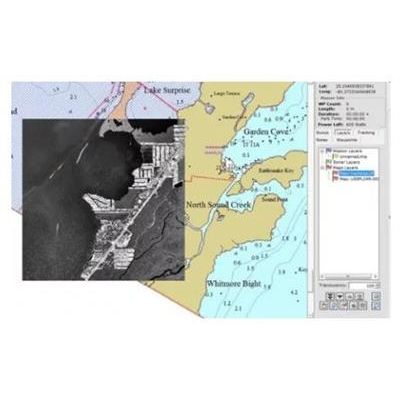
VectorMAP (VM) is a Windows mission planning software application that allows users to plan, review and create reports for the Iver family of AUVs. Missions are created using geo-referenced charts or imagery in a simple drop and drag methodology. After a mission is completed the VectorMAP tool allows you to overlay log data and plot or export sensor data for other tools. This tool can also be used to plot data lines for validating and debugging data. Users also have the option to generate automated mission reports in just a few minutes. Sonar records can be mosaiced and overlayed on the original mission plan. New missions can be created using the sonar records as the base chart(s). VectorMap has a full contact manager tool included for users to mark sonar targets of interest and generate reports.
Step #1: Loading a Map
Multiple maps can be imported into VM, in the image below a NOAA chart is overlayed with a geo registered image. This feature enables users to compare accuracy between different sources. In the example below a S-57 and GeoTIFF image are loaded. Most e-chart formats are supported.
Step #2: Adding Waypoints
Simply point and click to add waypoints and change the vehicle’s behavior, sensor logging can be modify per waypoint. A Lawnmower sweep can be added effortlessly by selecting the area the Iver will scan and VM will automatically synthesize the mission waypoints.
Step #3: Saving the Mission
Simply go to File and click Save Mission As.. Then save the file to the vehicle and you are ready to start the mission.
Step #4: Starting the Mission
First log on to the vehicle through Windows Remote Desktop
Open the vehicle’s program (UVC) and load the mission
Start Mission
Post Processing Data
After the Mission has been completed the Iver’s log and sensor data (such as Sides Scan, images and video files) can be downloaded and overlayed on VectorMap.
Overlaying the Log File
While the Iver is running a mission, the vehicle is continuously logging data that is time and GPS referenced. After the mission the .log file can me moved back to your notebook with VectorMAP and overlayed. VM can also create a color map of any data set in the log file.
Overlaying Side Scan Images
The Side Scan data is downloaded from the vehicle and the images can be overlayed on the current mission.
Overlaying Still Images
Still images can be overlayed on the current mission enabling users an easy way to sort through and find images of interest.
Generate Mission and Contact Reports
VectorMap allows users to easily generate automated reports from the mission data and contact reports for follow-up missions.