
DetecDataPro - Monitoring Data Management Systems
DetecDataPro provides users with access to their own monitoring data. It has a user-friendly interface that makes it easy for the customer to see the information and its integrated structure means that you have multi-screen viewing options, making it easy to switch screen views. This page is intended to give you an overview of the information accessible to DetecDataPro subscribers and the images below show examples of how your data is presented.
1. Project Overview
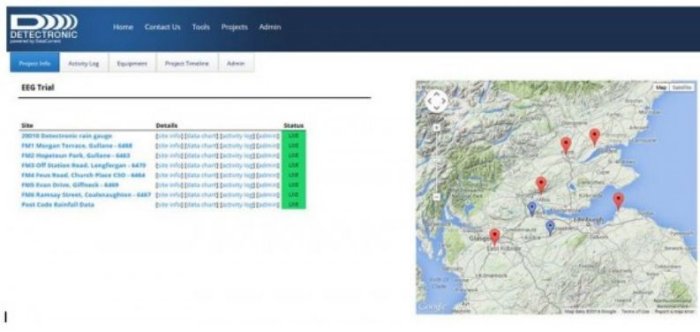
The example reproduced below gives you quick glimpse of all the individual sites associated with a project. View a list of all sites, their mapped location and current status. There is also a ‘Site Overview’ page which enables you to quickly review each site. The ‘Site Overview’ page was created to list all equipment installed, when it was installed, installation conditions and the location on a map with the ability to include GIS shape files. Custom information can also be added through the Administration interface.
For clients who maintain their own equipment, the ‘Activity Log’ is a place to record all actions at a site. Inspection, installation, maintenance, calibration and removal logs are available for field staff to enter all relevant information about a visit, including pictures and equipment updates.
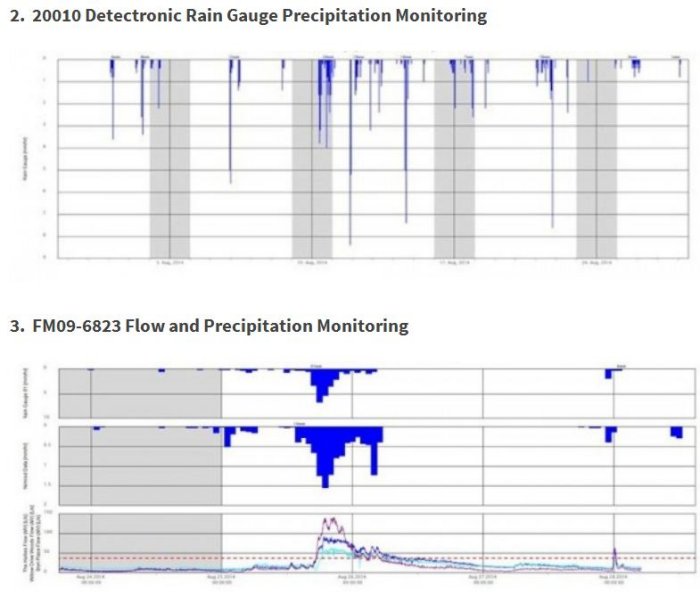
Probably the most used page in DetecDataPro is the Data Chart, which allows a user to review all of their data at once, or a couple hours at a time. You can view it as a line chart, summed up over intervals for continuous data, or for rain, from time of tip to hourly time buckets. You can also download the data as .csv files.
Easy navigation through time is provided by the calendar control or clicking and dragging on the chart to zoom in.