


- Home
- Companies
- Enera International AB
- Software
- RapidReach - Notification Panel ...
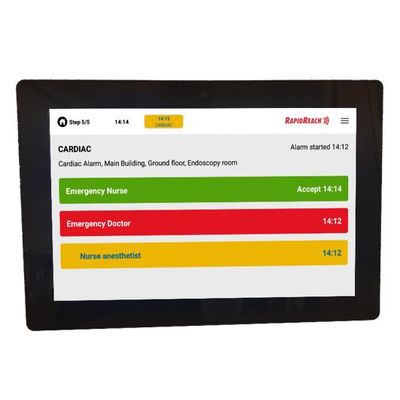
RapidReach - Notification Panel Software
RapidReach Notification Panel is an always on alarm panel. Designed with ease of use in mind, it allows instant access with no need to login. Speed of activation and simplicity is key. If you want a user friendly means to activate your emergency notification system, you have found what you were looking for. Built in monitoring ensures that your alarm panels are always working and ready for use.
Notification Panel makes it very easy to initiate alerts. Notification Panel is an always on device.
No login needed
All communication with the Notification Panel is encrypted and secure with TLS.
Messages cannot be intercepted.
The Notification Panel is easy to configure.
Once it`s configured it is ready for activation.
RapidReach Notification Panel is always on and designed to:
- Make it very easy to activate alerts to other devices
- Receive alerts on the Notification Panel screen
- Display location of panic button activation
As an alternative to using the browser on your computer you can use the Notification Panel to activate an alert. Using Notification Panel there is no screen to unlock, there is no login screen. The person starting the alert simply presses the required alert buttons on the touch screen of the alarm panel.
All relevant information can be sent in the alert message to the recipient by using the powerful concept of message pages. The person activating the alert selects the relevant button(s) and the message will be composed based on these selections. There is also a free text message page and you mix and match these different message pages according to your requirements.
After activating the alert, the Alarm Panel displays in real time who has received the alert and how they are responding.
The Notification Panel also allow you to receive alerts. When an alert is delivered to the Notification Panel, the alert will visibly appear, and dependent on configuration, the alert can be heard as an alarm sound or the alert message can be read aloud.
If the alert received on the panel requires a response, the required response buttons will appear on the panel for ease of use.
If the alert is activated by a lone worker, the location of the person activating the alert will be displayed on a pre-set Notification Panel/s. The location will be displayed on a map or site plan. This will make it easier for other personnel to assist the person who has activated the alert.