

Omega 365 - Comprehensive Workflow Management Software
A Workflow in Omega 365 defines a set of tasks that follow a customizable process, allowing team members to collaborate, track progress, and advance work through defined steps, while managing related data and ensuring access control to linked items.
With automated workflows and customizable templates, teams can ensure that processes are executed consistently and efficiently. Notifications and approvals keep tasks moving, while real-time tracking allows teams to monitor progress and address bottlenecks immediately. This reduces manual effort and ensures every step is completed accurately.
Integrated auditing and reporting features provide complete visibility into workflow progress and decision-making. Teams can track changes, view approval history, and ensure compliance with internal and external requirements. This level of transparency enhances accountability, helping to avoid delays and misunderstandings.
- Easily configure new workflows and modify existing workflows
- Automated emails notify users about required actions
- Dashboards give vital status information on workflow records
- Rich searching features and quick filters on key data
- Control workflow`s access through role-based permissions and confidentiality settings
- Delegate your authority to another user to cover your tasks while out of office
- Export workflow records into detailed PDF reports, or export workflow register to Excel
- Standard workflow templates for a variety of processes included out of the box
- Keep management up to date with drilldown project dashboards
- Interactive dashboard controls, with features such as:
- Click on report data set to drilldown into record details
- Interactive chart legends allow users to hide or display data groups on charts
- Export chart images for use in other media
- Create and manage custom reports
- Monitor performance by project
- Use the flexible filter generator to help find the exact data you require
- Share custom report filters with other users
- Export reports as PDF and Excel files
Management of Change
- Manage change requests and their impact on the project
- Monitor changes over time, late actions, and in/out of scope changes across all projects while using the MOC dashboard
- Determine the effect of approved changes on project cost
- Raise nonconformance reports to contractors, track responses, and approve implementation actions
- Assign company and contractor SPOCs based on referenced contract
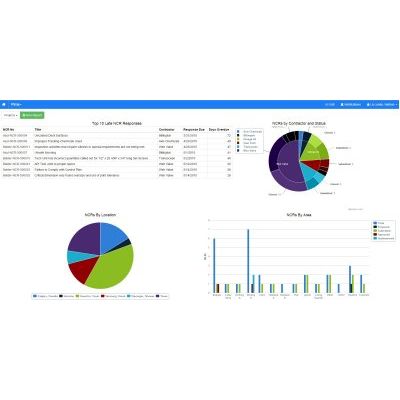
- Review top 10 late NCR responses or drill down into chart details in the NCR dashboard
- Raise Engineering or Technical Queries
- Allow access to external parties to view existing queries or raise and participate in new ones
- Monitor status of queries on one or many projects through the interactive Queries Dashboard
- Build a corporate lessons learned database
- Learn from other project experience to improve processes
- Review and discuss raised lessons before incorporating them into the corporate database
- Process requests to deviate from company standards
- Assess deviation impacts on a project
- Associate requests with other workflow records
- Assign and track actions to project personnel
- Tie actions into other workflow processes
- Monitor actions` status company-wide through the Action Tracking dashboard