

Online Audit Software
Effective Safety Audits Made Easy. Software that can Improve Your HSE Inspections. BIStrainer’s digital auditing software gives you the tools to effectively evaluate your HSE program’s implementation and performance. You can easily:Define the scope of your audit, Customize your digital inspection form, Assign the audit forms to the appropriate employees, Ensure every employee is complying with your safety policies, Communicate the audit results to leadership. Never again worry about a pile of audit paperwork or losing an important document. Digital audit forms can be securely stored, assigned, and found in the software program. This HSE inspection tool streamlines the entire auditing process.
Create and Assign Your Company HSE Audits
Completing successful audits has never been easier. With BIStrainer’s full suite of form-builder tools, you can quickly create efficient and effective forms.
Complete Customization
Organize your audit by department, work site location, or safety topic by creating categories. Build your audit criteria into a simple checklist or add Likert scales to items for more detailed compliance ratings. You can even include drag-and-drop fields so employees can add images, videos, and other documents. All of these digital capabilities make your audits more comprehensive and efficient.
Advanced Notifications
With advanced notification technology, you can streamline the audit review process by triggering automatic notifications to supervisors when designated fields are checked. Furthermore, escalating notifications allow you to notify additional managers if action is not taken by assigned supervisors within a designated time period.
Instant Reporting
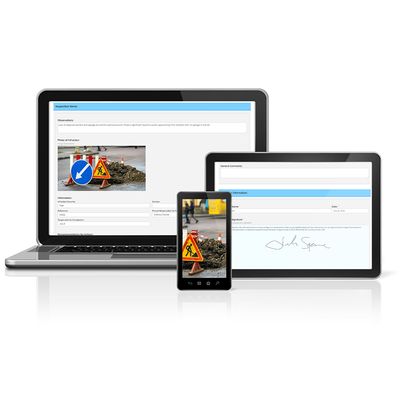
Thanks to this cloud-based software, you can access the audit information from anywhere and at any time, using a smartphone or tablet. BIStrainer keeps a record of each completed form and instantly compiles all of the form data into detailed reports. You can run summary reports to see your company’s safety practices and the HSE program’s effectiveness. Pull trending data and gap analysis to track problem areas and improvement. Send detailed reports to leadership for safety updates and progress.
Automatic Assignments
Deliver your forms to the correct auditors by designating those users as “evaluators” or by assigning forms to specific locations or user roles. Set a schedule, and BIStrainer will do the rest. These automatic assignments work for both internal auditors and external, third-party auditors.
Digital Authorization Sign-Offs
You can easily sign your digital forms.
Spend less time printing, signing, and scanning forms! To sign a digital form on a phone or tablet, simply use the touchscreen to draw your signature. If you are accessing the form on a desktop, you can sign documents with the mouse or upload a saved digital signature.