


- Home
- Companies
- Nuvia Dynamics Inc
- Software
- PEIConvert - Map Calibration and Survey ...
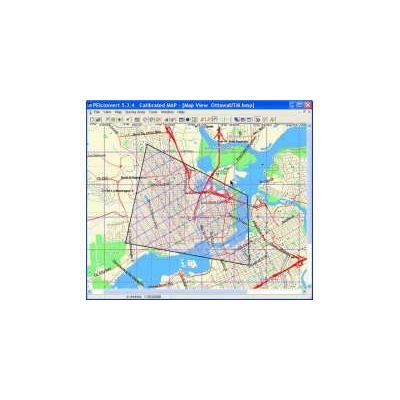
PEIConvert - Map Calibration and Survey Preparation
Map Calibration and Survey Preparation. Calibrate and convert maps for use with Airborne data acquisition and navigation, and Portable equipment. Tie the coordinates of a map with real-time coordinates from GPS and/or Glonass navigation systems. Runs on any PC compatible computer with Windows operating systems. Permits user to create and define survey area files (AREA.XYZ) required for determining the co-ordinates of flight lines and control lines. User may view the survey area with the traverse and control flight lines overlaid on the defined area. User may also display the survey area superimposed on a geographical map (if available).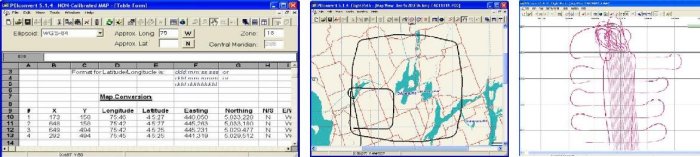
Any topographical map or digital image that is used as an underlay in any data acquisition system (DAS) or navigation system needs to contain all necessary information for proper positioning during the real time operation. The PEIConvert software allows the user to connect the coordinates on the map with the coordinates that are being received from GPS/Glonass navigation receivers.
The user can choose the type of projection for the map coordinates. UTM, Lambert and UPS projections are supported. A calibration procedure can be applied to the map stored in BMP format. In order to apply the calibration procedure, the user needs to define several coordinate points. After the calibration process is complete, the positioning information is stored directly into the BMP file.
The survey area is defined by entering the area vertex coordinate values (latitude/longitude or meters) as numerical values in a table or by placing the polygon corner points directly on the map with the mouse.
The user must define the survey line master point and spacing and the tie line master point and spacing. It is also possible to define special lines and waypoints.
All the position data is stored into the area file in ASCII format and can be used with the Data Acquisition system. If there is no map available, all preparation can be done without a map.
PEIConvert allows the user to examine the acquired flight path. The flight path file can be loaded into PEIConvert weather or not there is a matching map. It is also possible to view the flight path super imposed over a survey area polygon. If available, the flight path can be viewed with a map or digital image underlay.
PEI Convert also allows the user to load a PEI binary data file and the GPS-Magnetometer data file and the flight path will be displayed. The user can zoom in and zoom out the map for a more convenient view.