Cority
Medgate - Version GX2 -Risk Assessment
FromCority
Developed with certified industrial hygiene professionals, the Risk Assessment module is a central component of Medgate’s Industrial Hygiene Suite. This module will enable you to efficiently plan and build industrial hygiene risk assessment programs and perform ongoing analysis to continuously evaluate and effectively mitigate risk.
Most popular related searches
risk assessment
job hazard analysis
industrial hygiene software
industrial hygiene
hazard analysis
job hazard
hazard control
exposure monitoring
job hazard assessment
incident investigation
The Risk Assessment module will enable you to:
- Perform qualitative risk assessments using a streamlined, efficient approach
- Define and configure your own risk assessment approach or model
- Harmonize qualitative exposure assessment and quantitative monitoring results to determine risk and identify survey/sampling requirements
- Efficiently create surveys using Medgate’s IH survey builder tool
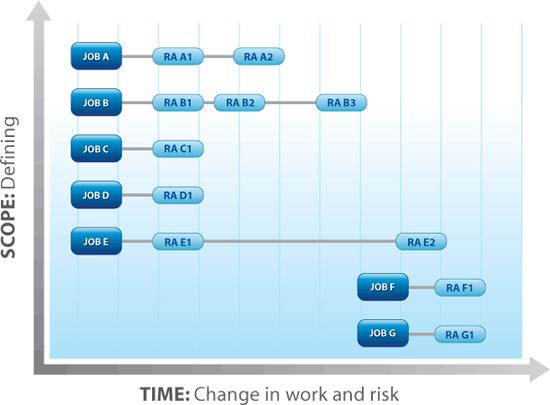
- Create and manage a complete inventory of ‘jobs’ or ‘work units’ on which you can base risk assessments
- Effectively prioritize resources based on risk
- Pro-actively evaluate and mitigate risk by tracking and trending changes in risk to jobs over time
- Promote effective ‘Management of Change’ by linking risk change to actions
- Support compliance management by tracking legal and procedural IH requirements by job while performing assessments
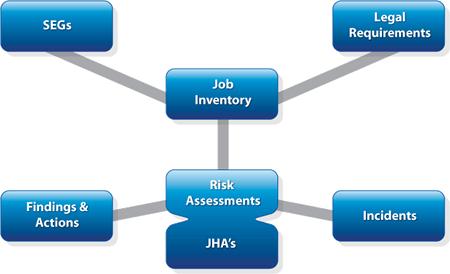
This module includes many invaluable features that will help you quickly and effectively realize the benefits described above. The features fall into five groups:
- Job Inventory
- Risk assessments / Job Hazard Analysis (JHA)
- Survey Builder
- Risk Assessment Metrics
- Integration Points
- Maintain an active inventory/description of the continuously evolving scope of your work by defining and managing an active list of the ‘jobs’ or ‘work units’ which require assessments
- Link any number of legal and other requirements to each job so that you can efficiently build a needs assessments by job/area
- Create exposure groups based on job/work unit and add jobs/work units to an exposure group based on risk assessments. This offers a powerful way to implement mitigating actions (ie: training) or recall employees for job required surveillance
- Track all task, hazard, control, and risk assessment inputs in one record, allowing you to easily visualize the risk, understand key controls, and prioritize actions for risk reduction
- Configure the tool to your company risk assessment methodology: choose which risk factors, control factors, formulas, colors, icons, values you require
- Generate and store standard statistical data and efficiently interface with the latest Bayesian analysis statistical tool to help facilitate and validate the best professional judgment when making final decisions regarding risk
- Allow assessors to describe task, hazards, and controls with both free text and user-defined drop-down choices
- Visualize the risk before and after a control is introduced with the option to add a third iteration of risk that is based on an ideal / future control
- Use a powerful and configurable risk calculation tool to automatically determine risk based on your requirements. This tool can:
- Incorporate up to 12 different factors including probability, severity, and frequency
- Calculate risk using a matrix model with pre-defined risk level for each quadrant, OR
- Calculate risk using user-defined simple or complex formulas
- View Job Hazard Analysis in a separate, simplified view for worker training and compliance to JHA requirements. There is also a system-generated JHA report.
- Link to incident investigation data so that investigators can view active assessments related to a job where an incident occurred
- Save time with many efficiency tools, including copy, clone, and inactivation actions for a risk assessment task
- Seamlessly manage survey creation through Medgate’s Survey Builder tool, which is embedded in the Risk Assessment module:
- Survey will be automatically built based on the main processes, tasks, and agents that should be considered as a result of the risk assessment
- Key information from your risk assessment (i.e.: agent, process, task, job position, and exposure group) will automatically be pre-populated in your survey
- Use Medgate`s Metrics tool to build flexible graphs using any risk data so that you can track risk change over time or compare risk in various locations
- Post any graphs you build to your dashboard
- Define any custom measures that you wish to track, and use those measures to compare to standard Medgate system measures (for example, track targets vs. actual)
The Risk Assessment module is present in all of the Medgate Software Suites. Below is a list of the modules that integrate with Risk Assessment in the Industrial Hygiene Software Suite:
- Findings and Actions
- Monitoring
- Survey