

Rocscience RSLog - Web-Based Borehole Log Management Software
Centralizes your borehole data and streamlines collecting, reviewing, and preparing borehole logs, both in the office and on the field. gINT support ends soon, but RSLog offers much more!
Migrate your historic gINT data to RSLog today and start designing your own borehole logs to centralize your valuable database.
Centralize your borehole data for more efficient management, without needing to download software. RSLog supports various soil and rock types with over 230 hatch patterns to choose from (or upload your own), making it ideal for geotechnical, environmental, and mining projects with large amounts of data.
Customize your borehole logs with our versatile template designer to match your company`s branding and data collection standards. Create unique log templates for different projects and clients, and expand sample types, field tests, and other lists in RSLog to suit your needs.
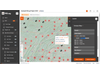
Use the built-in GIS map to store and organize all your projects and boreholes, including pre-existing projects (gINT, DIGGS, AGS, Excel files) and geology maps. This simplifies the way you organize and access important projects, and there are 400,000 (and growing) public US boreholes available to you.
Please refer to the following document for a thorough list of features and capabilities of RSLogRSLog - Overview of Features
- General Borehole Data (e.g. title, depth, water level, verticality, etc)
- SPT Hammer & Sampler Details
- Groundwater Monitoring Data
- Coordinates
- List of Samples
- Field Tests (SPT, Pocket Pen, DCP, CPT, etc)
- Comments and Drilling Observations
- Stratigraphy Data (lithologic descriptions)
- Drilling Details
- Drill Runs (rock)
- Discontinuities (rock)
- Piezometer / Well Installation (nested piezometers are supported)
- Laboratory Test Results (for each sample)
- Lab Test Request System (coming soon)
- Project Photos
- List of Sample Types
- List of Field Tests
- List of Drilling Methods
- List of Laboratory Tests (user-defined)
- List of Piezometer/Well Types and Plug Types
- List of Moisture Descriptors
- List of Sample Location / Status
- All Soil Classifications (e.g. particle size, shape, moisture descriptors, plasticity levels, consistency, etc.)
- All Rock Classifications (e.g. strength, weathering, alteration, slaking, defect types etc.)
- Role-Based User Management (permissions and access levels)
- iOS/Android App for Field Data Collection
- Lab Test Request System + Test Results
- Borehole Log Preparation
- Log Template Design
- Fence Diagram & Cross Section Design (2D / 3D)
- Report Figures (for site location map and boreholes location map)
- Project Summary Report
- Photo Report
- GIS Map with Import / Export Capabilities
- Pre-investigation Planning
- Project Archive and Transfer to DoT`s
- Import from gINT, Excel, DIGGS, Wincore, AGS
- Export All Data to JSON, Excel, etc.
- User-Defined Data Entry Fields for Borehole and Project (i.e. Extra Tags)
- WGS84 (Latitude, Longitude)
- UTM (Easting, Northing)
- Projected: EPSG and SPCS (Easting, Northing)
- Local Datum (Easting, Northing)
- Unified Soil Classification System (USCS)
- American Association of State Highway and Transportation Officials (AASHTO)
- Association of Geotechnical and Geoenvironmental Specialists (AGS)
- Rock
- User-defined (i.e. hatch image uploaded by user)
- Excel, CSV
- gINT
- DIGGS
- Wincore
- AGS
- KML / KMZ
- Excel, CSV
- JSON and GeoJSON
- DXF
- Civil3D
- PNG and SVG
- Google Earth (KMZ)
- Online:
- via https://www.rslogonline.com (access from anywhere and anytime)
- via RSLog iOS/Android App
- Offline:
- via RSLog iOS/Android App
- via RSLog Excel Templates