- Home
- Companies
- Cambridge Environmental Research ...
- Software
- Run Manager - Run Organizer for ...

Run Manager - Run Organizer for Environmental Simulation Software
Run Manager is a tool to help users manage their model runs and make the most of their CERC licence(s). It gives greater flexibility by sharing all licensed PCs across the local area network. Runs can be defined by users on their own unlicensed PCs, submitted through Run Manager to be executed at the first opportunity and the results returned to the users on completion.
- allows multiple runs to be executed concurrently
- utilises multiple machines on a network and multiple processors on each machine
- enables users to prioritise their runs
- allows users to monitor the progress of runs, providing estimated end times
- provides a centrally-located list of available models, ensuring all users use the same model versions
This diagram shows an example of several users sharing two runs machines.
CERC has been using a version of the Run Manager for over 10 years. It is suitable for use in consultancies, and by city and regional authorities.
Run Manager enables users to group large urgent ADMS runs to be executed on the most powerful PCs available. It provides an estimate on the time required to complete each model run and allows flexibility on machine allocation when performing multiple project runs. Run Manager can organise and execute runs for all the following models: ADMS, ADMS-Roads, ADMS-Urban and ADMS-Airport.
- Start automatically on Windows Startup
- Search automatically for queued model runs when Run Manager is started
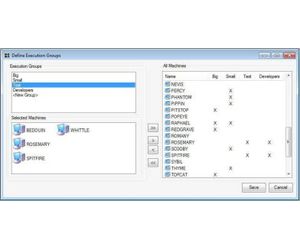
- Search automatically for queued runs after a specified time e.g. evenings and weekends, for PCs in use during office hours
- Manage the priority of runs
- Prioritise different working groups
- Schedule urgent projects to most powerful PCs
- Drag and drop your UPL/APL files from Explorer onto Run Manager
- Define the model to use, the priority of the run and the Execution Group

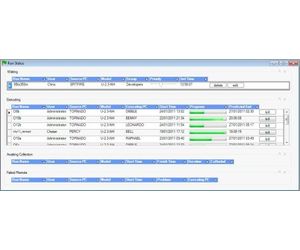
- Check run status: waiting, running or finished
- View estimated end times
- Check PC status: executing, searching or idle