


Sierra Instruments, Inc.
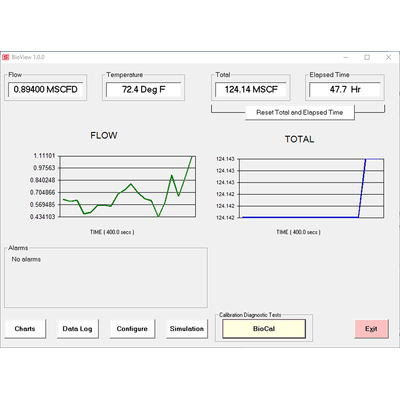
Sierra - Version BioTrak 645S/745S BioView -Configuration and Data Logging Software
Sierra’s BioTrak 645S/745S BioView advanced software is a free PC-compatible application available for download here. Connect your Windows-based laptop or PC to the meter using the USB port interface to access meter data and configure the meter’s settings.
Most popular related searches
- Quick access to all configuration parameters with pop-up windows and pull-down menus
- Selection of measurement units, flow and temperature ranges, and more
- BioSelect™ menu provides field selectable air, methane, and digester gas
- BioCal™ Calibration Validation provides quick and easy way to field validate calibration
- Set alarms; display alarm codes
- Data logging to an Excel® spreadsheet
BioTraks’s BioView software offers field flexibility by allowing users to quickly access all configuration parameters with pop-up windows and pull-down menus.
With BioView you can also use simulation mode to align 4-20mA output with the input to the customer`s PLC/DCS, and view raw data to diagnose or troubleshoot your meter.
Get Started > Download BioView
Note: BioView requires a working version of Microsoft Office installed on the PC before installing.A USB driver is needed for BioView to run. If the USB drive does not install automatically, you will need to download it.