

Sierra Instruments, Inc.
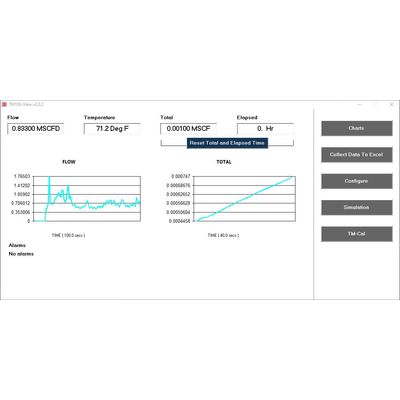
Sierra - Version TM100-View -Meter Data and Configuration Software
Sierra`s TM100-View advanced software is a free PC-compatible application available for download from Sierra`s website. Connect your Windows-based laptop or PC to the meter using the USB port interface to access meter data and configure the meter’s settings.
Most popular related searches
Get Started > Download TM100-View Software
Note: The TM100-View software requires a working version of Microsoft Office installed on the PC before installing. A USB driver is needed for TM100-View to run. If the USB drive does not install automatically, you will need to download it.
- Get quick access to all configuration parameters with pop-up windows and pull-down menus
- View raw data to diagnose or troubleshoot your meter
- Select measurement units, flow and temperature ranges, alarm settings, and more
- Print or save a TM-Cal™ Calibration Validation Certificate
- Set alarms and display alarm codes
- Optional Gas-Mix Menu
- Use simulation mode to align 4-20mA output with the input to the user’s PLC/DCS