


- Home
- Companies
- VLogic Systems, Inc.
- Software
- VLogic - Space Management Software
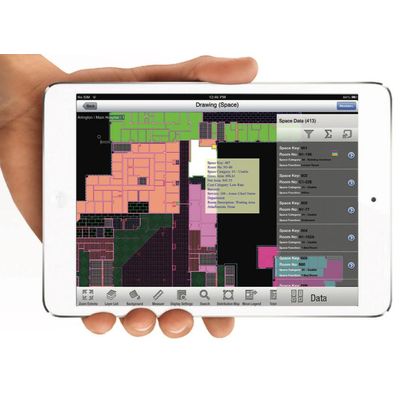
VLogic - Space Management Software
Good enterprise facility management is founded on a firm grasp of operating costs, a clear view into how space is utilized, and the right tools to manage it all. Customers deploy VLogicFM®, VLogic’s pioneering, integrated space management software solution, to keep track of facility metrics and streamline space utilization.
-
Speed-up Facility Cost Account.Space management software makes it easy to track space utilization costs by departments, accounting line items, employees, or any other space requirement—AND, export the results to Excel.
VALUE: Improved cash flow due to faster Medicare/Medicaid reports, better accountability of departmental charge backs, etc.
-
Track Actual Occupancy in Real-timeUse IoT-based occupancy sensors to discover actual occupancy feedback about any room in your facility, in real-time or over any period you choose.
VALUE: Reduce risk of costly overbuilds and streamline space utilization and sharing of common rooms such as conference rooms, patient exam rooms, etc.
-
Enable Room Assignments & Move PlanningVLogicFM lets you assign employees and departments to available rooms and facility assets. Built-in stacking plans display how each department is utilizing floors and buildings. Plan, track, and execute employee moves, along with assigned facility assets, with our space management software.
VALUE: Optimized, data-driven move planning and execution
-
Take Control of Facility DrawingsStore as-built drawings in your own Virtual Plan Room in the cloud, with easy, flexible, roles-based access to your digital floor plans—across the enterprise. Built-in Smart Drawings Engine requires no plugins or third-party installs. Access from your web browser or smart device.
VALUE: Gain control of facility drawings files, maintain version control and centrally manage sharing privileges through roles-based access control your employees, contractors, and stakeholders.
-
Manage Occupant Service RequestsProvide occupants a cloud-based solution for managing facility occupant work repair requests, assigning technicians, reporting status, and finally soliciting service requestor feedback.
VALUE: Improve occupant satisfaction and streamline on-demand facility repair processes.
-
Manage FurniturePlan furniture layouts, group furniture by classes, and track their location on the facility’s floor plan.
VALUE: Simplify the assignment and management of furniture using VLogicFM’s location-based user interface.
VLogicFM’s space management software pioneered a user interface centered around a native CAD drawings engine. This drawings engine lets users store, display, and share facility CAD drawings without the need for third-party software or licenses. Furthermore, our space management software intelligently links spaces and rooms on these digital floorplans to a rich database of related facility information.
For customers, the linking of rich data to facility drawings greatly simplifies that task of understanding What facility metrics they have, Who is using it, and Where it is located.
Many of VLogic’s customers must manage complex facilities with hundreds of thousands of square feet of multi-purpose space. The biggest problem is not how much data needs to be stored and managed. VLogicFM’s massive cloud storage resources can easily ramp up to accommodate practically any volume of data.
Rather,the real issue, is how to organize the data and display it in a context that makes sense to facility users. VLogicFM users range from facility managers/engineers to facility occupants who want to schedule rooms or request facility repair services. They all have different usage requirements.
However, all users share one thing in common: they are all oriented to the facility’s buildings, floors, and rooms. VLogicFM’s space management software leverages this common denominator by linking multiple layers of rich facility metrics to the same CAD floor plans used to design and construct the facility.
Facility data is divided into a spatial heirarchy consisting of sites, buildings, floors and rooms—all anchored to accurate CAD floor plan drawings.
Tap or click on a room in a VLogicFM floor plan to instantly see its square footage and the space functions and properties linked to that space—including ancillary files such as photos and documents. Finding a room by its number, function, or description is a snap. The space management software’s advanced search function let’s you rapidly find room properties in a data grid AND on the floor plan.
For example, a search for rooms with the function “Patient Exam” will not only result in rows and columns of data, but also highlight each Patient Exam room on the floor plan—AND give you the total number and square footage of all rooms in your search results.
VLogicFM’s drawings-centric user interface makes it easy to navigate through the many layers of complex facility data without getting lost in the minute of database tables and never-ending spreadsheet cells.
VLogicFM’s space management software’s smart drawing engine is native to its solution. That is, users will NOT be required to install any third-party software, browser plug-ins, or pay for any additional third-party software licenses. It’s all built in.
CAD files can be displayed and shared by using a standard web browser or iOS/Android device. This saves customers from paying for expensive third-party CAD viewing software licenses. Furthermore, as there is nothing to install, customer IT teams are freed up to do other valuable tasks.
What? | Who? | Where?
VLogicFM’s user-friendly web/mobile user interface makes it easy to answer three, broad questions that lie at the heart of any space management software’s facility mission:
- What do I have?
- Who is using it?
- Where is it located?
Answers to these questions help facility managers proactively manage their facility resources for maximum efficiency and cost reduction.
The following tables outline how VLogicFM addresses these major questions by listing typical facility requirements on the left with matching VLogicFM software solutions on the right.
Facility Drawings & Documents
Static drawings & miscellaneous documents
- Store digital versions of drawings in PDF or CAD
- Store facility-related documents in multiple file formats
- Share access with all stakeholders on / off site
- Fast retrieval by employees and contractors
- Find files by keywords in addition to file names
- Cloud-based Virtual Plan Room for access across enterprise
- Advanced meta-data search capabilities
- Store and display 70+ file formats including CAD, PDF, docx, etc.
- Web and mobile access
- Roles-based access control
Master as-built drawings
- Organize as-built drawings into one set of master as-builts
- Store master as-built CAD files in one place
- Share as-builts with employees and contractors
- VLogic drafting support creates master composite drawings at deployment
- Store master as-built CAD files on the cloud
- Unlimited as-built updates during subscription
- Built-in markup tools for collaboration by internal and contract stakeholders
- Share as-builts anywhere, anytime over the Web or smart devices.
- Determine square footage of sites, building, floors, & rooms
- Discover total space and space allocations by room function, department, description, physical properties, room number, and other space drivers
- Render powerful VLogicFM search results based on the link between a room on the floor plan and the room’s various attributes stored in our cloud database: room #, space function, room description, floor treatments, lighting, etc.
- Advanced search results not only lists results in a data grid but also highlights those results on the floor plan
- Square footage of search results can be totaled with a simple click or tap.
- Assign each room to a department
- Calculate square footage used by each department
- Attribute a cost per square foot for the facility
- Discover the cost and space used by each department in a portable format that can support regulatory or standardized reports, such as Medicare/Medicaid
- Display Distribution Maps by department to show colorized floor plans & a legend with square footage numbers by department
- Run Organizational Area Distribution reports to see printer-friendly, departmental usage reports of site/building/floor, including usage cost
- Export distribution reports to Excel or PDF for inclusion in standard reports such as Medicare/Medicaid facility usage reports.
- Assign rooms to employees
- Find rooms by employee
- Manage employee moves
- Review employee space distribution by department
- Link rooms to employee assignments
- Select an employee in the employee list and show that employee’s location on the floor plan
- Use advanced search to find an employee’s room assignment using any data fields associated with that employee: name, date of hire, phone, email, etc.
- Display stacking plans to show how many employees each department has assigned to each site, building, and floor, and view vacancies and shared “hot desking” seats.
- Forcast seat requirements by department based on projected growth percentages and hybrid workforce numbers
- Run standard reports showing: Sqft Analysis (area per employee, cost per sqft, etc.); Occupancy Details (occupied/available seats), etc.
- Book conference rooms, patient exam rooms
- Calculate square footage used by each department
- Attribute a cost per square foot for the facility
- Discover the cost and space used by each department in a portable format that can support regulatory or standardized reports, such as Medicare/Medicaid
- Book common areas using a simple web / smart phone-based interface on demand or using pre-defined approval process, at customer discretion
- Room amenities (white board, projector, printer, etc.) can be bundled with each room reservation
- User bookings are stored in personal bookings calendar on the cloud for easy retrieval
- Pre-define desks and rooms that are “hot”
- Empower users to book shared seats/rooms without restriction, or
- Book rooms restricted to users who are part of a project or members of a department
- Display stacking plans showing assignable seats and host-desking seats by availability and status
- Allow wokers to work from home
- Provide temporary room/desk assignments based on shift or custom work schedules
- Pre-define desks and rooms that are “hot”
- Empower users to book shared seats/rooms without restriction, or
- Book rooms restricted to users who are part of a project or members of a department
- Display stacking plans showing assignable seats and host-desking seats by availability and status
- Show room occupancy in real-time
- Track actual occupancy data over time
- Use IoT sensors to track occupancy in any room with sensors installed
- Send real-time data to the VLogicFM cloud over wireless gateways, removing need for accessing customer LANs
- Display live data on the floor plan for easy room location
- Display dashboard of historical data by room, time, or date
- Show dashboard status of room utilization by average, under-utlized and over-utilized stats