


WellSight Systems Inc.
- Home
- Companies
- WellSight Systems Inc.
- Software
- StarLog - Version 8.6.0 - Geological ...
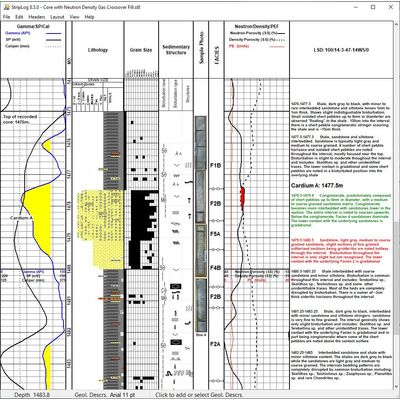
StarLog - Version 8.6.0 -Geological Strip Log Software
At WellSight we are continually adding new features and enhancements to our products. Version 8 represents a substantial improvement in usability and modernization of our products, without changing their familiar, easy to use interfaces.
Most popular related searches
-
New Features
- Lithology Boundary Fill: In HorizontalLog, Lithology can easily be drawn and edited by filling the area between boundary lines.
- Select Multiple Vertices and perform certain actions (delete, add segments) for them all at once.
- Text Formatting Properties allow you to change Text Font, Style, Size and Color in Geological Descriptions and other text layers.
- Fill Data Curves: Data curves can be filled cumulatively or using threshold values or curve data cross-overs for any two curves.
- Gas Ratio Curves: for Character, Wetness & Balance.
- View Track Headings: Track Headings can now be displayed on the screen while viewing and editing our logs.
- A log file can now have multiple Core Header sections which can be exported and printed.
- New Image Layer allows you to quickly add images by drag and drop.
- Images can now be imported from jpg, gif, bmp, tif and png files.
- Depth Tracks can now show MD, TVD and SS depths.
- Sub-sea depths are now supported in surveys and throughout the programs.
- Errors in LAS data files are now handled better when importing curve and survey data:
- Minor formatting problems are fixed automatically.
- Errors that cannot be fixed are listed for the entire file so that they can all be fixed at once.
- Updated Help System and Tutorial.
- Lithology Boundary Fill: In HorizontalLog, Lithology can easily be drawn and edited by filling the area between boundary lines.
- StarLog’s appearance has been modernized to use the style of the Windows version on which it is running.
- Color properties (e.g. lines and text) now use a newer version of the Color Picker Dialog. Custom Colors that you define are now saved with the log and made available when it is re-opened.
- Touch interface for tablets, including scrolling and zooming.
- Drag and drop to open log files.
- Edit windows can now be resized to use today’s larger screens.
- The Quick Info Bar gives better context information, including MD, TVD and SS depths, in a larger font.
- Enhancements to context menus give quicker access to editing windows.
- Scrolling and zooming enhancements
- Drag and drop to assign imported data curves to log curves.
- Keyboard short-cuts were added to the File menu and standardized on the Edit & View menus.
- Poly-Lines are easier to edit.
The latest Versions of StarLog support:
- Windows 7, 8.1, 10
- Windows Server 2012 R2, 2016, 2019
- All WellSight programs can read log files that were written by previous versions.