


- Home
- Companies
- SkyCiv Engineering
- Software
- SkyCiv Engineering - Steel Connection ...
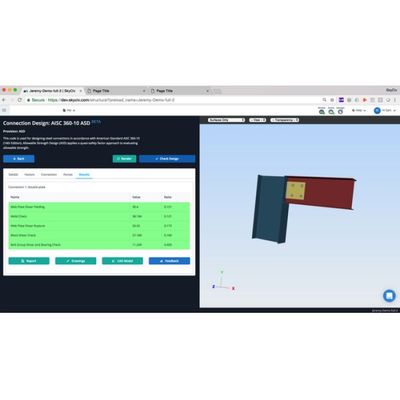
SkyCiv Engineering - Steel Connection Design Software
SkyCiv Structural Steel Connection Design software offers prescriptive design calculations and checks as per the AISC 360-10 design code, for both ASD and LRFD as well as Eurocode 3 Design Standards. The structural design software is completely cloud-based, so there`s nothing to download or install, and is run right from within your browser. Eurocode Connection Design and AISC Connection Design, right from your browser.
The SkyCiv structural steel connection design software has the following great features:
- Range of connection types, including W-W and HSS-W standard connections
- Full 3D rendering to show bolts, plates and sections
- Prescriptive AISC 360 and Eurocode 3 checks for Shear and Moment Calculations
- Professional Drawings
- Export file as CAD (STEP) 3D model
- Clear summary of design results with green and red pass/fail results
- Detaileddocumentationwith videos and tutorials on how to use the software.
All your connections forces and member properties are automatically imported into the SkyCiv Connection module - so you can view your model and connections at the same time.
- Connections display on the graphical interface
- Forces automatically imported from structural analysis model
- Supports load combinations from ASCE 7-10, AS 1170, EN1 and CSA
- Changes to your analysis model are auto-adjusted within the design module
- Class and group steel connections together, to complete one design for multiple connections
- Review all Connection Designs in 3D model with green/red/yellow result summaries
Review your 3D model so you can see the various parts of the model in 3D space. The Connection Design module will also generate a full CAD file for you to export or send off to the draftsperson for final drawings. Don`t have CAD? You can produce drawings directly from within the SkyCiv Connection Design module!
- Generate full CAD files (STEP) with bolt, plate and member connection assemblies
- Produce clear drawings directly from the module
- Clear and easy 2D references for user input
- Full 3D rendering display with wireframe and viewing settings
SkyCiv Connection Design reports in the form of a summary report and a comprehensive calculations report. No more guesswork into what the software is calculating, these detailed professional reports show the step by step calculations including:
- References to relevant chapters and checks (for both AISC 360 & Eurocode 3)
- Custom Company logo and model setup information
- Detailed calculations of all checks
- Relevant assumptions and failure criteria
- Clear pass/fail summary results
- Download Sample Shear Connection Design Calculation Report
SkyCiv structural design software is all on the cloud, which means you can get instant access simply through a web browser. There is nothing to download, install or maintain. Simply login to your SkyCiv Account and visit the software directly. Online structural analysis software has a range of benefits over traditional software:
- Instant access - there`s nothing to download, no installation and no license keys
- Updates are automatically rolled out to the user
- Access your files and software from anywhere at anytime
- Fully compatible on PC, MAC, tablets and mobile devices
- Reduces the clutter on your computer
- No IT requirements