


- Home
- Companies
- Eworks Manager
- Software
- Eworks - Version GEO - Team Planning ...
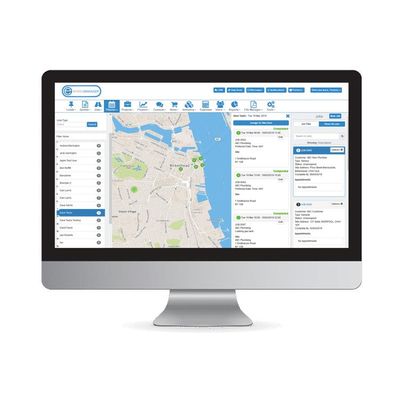
Eworks - Version GEO -Team Planning Software
Planning Software Designed to Manage and Keep Track of Your Team in the Field. If you run your own business, you will know the struggle of an endless amount of paperwork and post-it notes dotted around the office. Planning your jobs this way can be confusing, tedious and frustrating. Eworks Manager has helped companies with just that, especially with our Planning System.
Planning Systems are the perfect solution for connecting office admin staff and managers with your mobile workers in the field. Our mobile app provides you with real-time updates and notifications and allows your on-site team of workers to update their job statuses on their smartphones. This automatically notifies administrators in the office of a status change. Our software makes it very simple to identify the current availability of each technician and allows you to plan for delays or to assign additional work if jobs are completed quickly. Our Geo Planner effectively boosts productivity and service levels by simultaneously keeping track of job schedules and your mobile workers.
Our Geo Planner map view lets you see a live location stamp of your workforce out in the field. When your team receives a new job, your office staff can quickly appoint the closest and next available worker to that job. The Geo Planner will also show you each workers` jobs for the day, so that you can plan your jobs more efficiently and economically. By using the Geo Planner to schedule and assign jobs, you will save on fuel costs and time, because your workers will only complete jobs that are close to their last appointment.
This feature allows you to plan jobs more efficiently by using the Mobile Tracking feature. The map view displays the worker`s journey to each job. Which means that if they happen to be travelling to a job and an emergency job comes in, the worker can put their current job on hold and tend to the emergency job quickly.
The Mobile Tracking map also displays the worker`s battery percentage for their device, which informs the office why a worker may not be accepting a job on the mobile app. From this, they can then quickly assign it to the next closest available worker.
Eworks Manager`s Vehicle Tracking features as a planning software tool. The map view displays the live location of vans out in the field and allows you to schedule new jobs to the closest available worker.
View all appointments booked out for the day for a specific worker, and see if and when they have an available time slot to do another job. The various search options will also let you search a specific postcode, showing you a pin drop of the location and the closest worker to it. View all unassigned jobs and, with the click of a button you, can assign it to one of your workers in the field.
The Live Panel in the Admin System assists your admin staff with making fast and efficient decisions to the responses. The live panel displays a live feed of the progress your workers have made with their jobs. This ensures that the designated admin staff can authorise jobs and send them for invoicing almost immediately. The system also ensures that no jobs are forgotten or misplaced while waiting for workers to bring the job cards back to the office.