


TestIT - Software Solution
Nolek has developed market-leading software to compliment its machines and instruments. It enables leak testing sequences to be integrated into several types of function tests, as well as storage of important statistical information. We can also offer customized software solutions for most test applications.
- Faster programming than in a PLC!
- Highest flexibility!
- Simple to adjust for the customer!
- Function tests besides leak testing!
- All measuring values are saved in a database!
- Barcode prepared!
Nolek’s TestIT is an own developed software program for machine sequence control via profibus system. The program is built in Visual Basic 6 and an Access database. All measurements results a stored in a database. Programming is done in a script editor system to make it user friendly and easy to customize. This gives a very flexible machine control tool directly from the PC. An electrical cabinet includes necessary safety components, power supply, profibus modules (I/O and analogue modules). A standard computer (PC) is usually used and is built in a cabinet. The PC-screen is used as an operator panel and gives a clear interface with the operator.
Test descriptions and messages shown on the screen is changeable to suit the customer and could be written in any language. Other non-changeable text is written in English.
It is an “open” interface (Password protected though), which makes it possible for the customer to do the configuration without any previous experience in programming.
Below is the start view shown. Pick “Production” or “Programming” and execute the following simple steps.
- Choose “Article number” from a previously inclined part list. The operator chooses the product to be tested.
- Choose test program. This choice means that the customer could have several different test programs prepared. Depending on the range of the test, prepared programs could include; simple partial test, several partial test, complete test or just function test.
- Choice of operator, log in could be done through entering a password.
- All set for testing!
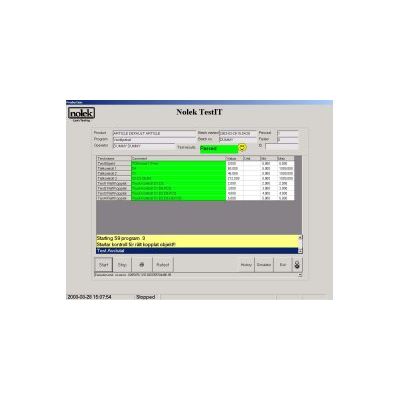
The clarity over what is happening at each stage during the test is a priority in TestIT. The different partial tests are clearly shown and described and will be marked in green in the “Comment” field if it is approved. If not approved, it will be shown in red.
The different partial tests are described in the yellow field. Information over what is going on at moment is shown. It is also possible to add requests for the operator and the system waits for the operators’ receipt before it continues. This is often used when running in manual mode.
- Password: To access the programming mode, a password is required.
- Programming mode: Sequence programming of inputs, outputs, analogue signals, variables, calculations etc. Functions for printing labels and communication with bar code readers etc is also available.
- Commands: When programming a function is chosen for commands. The choice is automatically inserted in the program window. See example to the left with Set.
- Declared outputs: Choices of the declared outputs are automatically inserted in the program window. Choices for inputs, analogue signals both inputs and outputs is also possible.
- Database: All measuring results are stored in a database. Tools to display tested parts and the measuring results.
- Manual: There are also tools for manual drive of all inputs/outputs.