


GISonLine
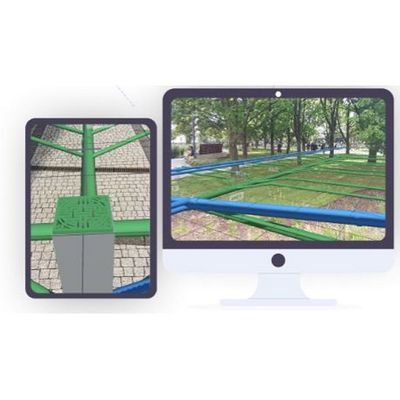
Version ARonLine -Augmented Reality Data Visualization Software
FromGISonLine
An Augmented Reality mobile application designed to transform how you visualize underground utilities and infrastructure.
Most popular related searches
underground utility
data visualization
geospatial tool
locating underground utilities
utility asset
underground utility infrastructure
geospatial
utility excavator
utility infrastructure
geospatial data
ARonLine
Real Time 3D Visualization of Underground Utilities
- Augmented Reality Visualization
- ARonLine is an Augmented Reality (AR) application specifically designed for visualizing underground utilities and assets. ARonLine uses AR technology to superimpose digital information (like geospatial utilities data) onto a mobile device`s camera view.
- Increase Field Crew Safety
- Utility crews, excavators, engineers and construction teams use the ARonLine mobile application to visualize the location of underground utilities in real time. Increase field crew safety and reduce the risk of damages to underground assets.
- Simple and Easy to Use Interfaces
- The ARonLine application User Interfaces are simple and easy to use and provide field crews and constructions teams with the ability to quickly visualize underground utilities and assets.
- Keep Your Projects Organized
- Stay organized and collaborate with others using the ARonLine Project features, which are designed to group and categorize data associated with site locations and project areas.
- Phone / Tablet Ready
- ARonLine is available on Android supported mobile devices and can be downloaded directly from the Google Play store.
- E5RIGIS SCAD Support
- Visualize your CAD or Esri ArcGIS datasets in Augmented Reality. ARonLine works with GI5 and CAD utility datasets that have been georeferenced to their physical location.
- Calibrate for High Accuracy
- ARonLine provides users with the ability to calibrate the AR data to existing physical features to support higher levels of accuracy without the need for external GPS devices.
- Unlimited Licenses
- A subscription to ARonLine includes unlimited number of Users and Projects per organization allowing field crews and mobile workers the ability to access and use the ARonLine application
- Geospatial Tools & Analysis
- ARonLine contains built-in tools such as viewing feature attributes, measuring feature lengths, and setting desired feature symbology to support communication and decision making.
- Create Projects & Stay Organized
- Organize your work and collaborate with others based on Projects created within the ARonLine application. Each Project provides the ability to load in desired datasets associated with your project site or area of interest and visualize in augmented reality mode.