

- Home
- Companies
- CrystalMaker Software Limited
- Software
- Version CrystalViewer 11 - Exploring ...
Version CrystalViewer 11 -Exploring Crystal & Molecular Structures Software
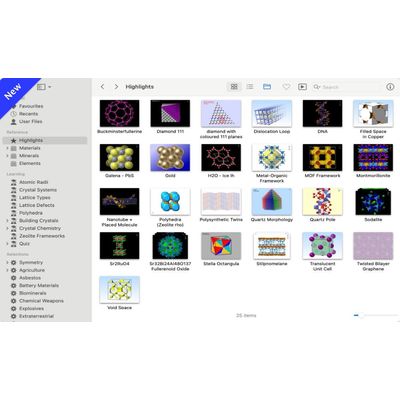
CrystalViewer 11 is a brand-new application for exploring crystal & molecular structures. Based around a "photo-album" interface with gorgeous "Retina" graphics, CrystalViewer's comprehensive, curated structures library is a delight to explore. Users can visualize - and interact with - any of the included structures. With its real-time rotation, scaling, measurement - and breathtaking "out-of-the-screen" 3D stereo - CrystalViewer blows away dusty laboratory teaching and empowers students to understand our crystalline world.
Our comprehensive Materials Library includes some 1400 structures (annotated, with references and metadata), grouped into three broad categories: Hybrid Materials, Inorganics and Organics. A dedicated Minerals Library contains some 600 minerals, including major rock-forming minerals, gemstones, ores, high-pressure phases and extraterrestrial minerals. (Also included in the Inorganics library.)
Take advantage of powerful search and flexible browsing to quickly find the structures you need. The Search command (available at all times in the browser) includes a "Smart" search mode which identifies chemical formulae - but can be extensively customized via a Scope bar. Search results are presented in the browser - here shown in its "List View".
CrystalViewer's sidebar provides a comprehensive hierarchical guide to the reference and teaching libraries, but you can opt to show an index of structure names, an index of minerals or even an index of chemical formulae (with automatic grouping of isomers/polymorphs).
CrystalViewer's "Measurement Mode" provides interactive identification and measurement - with haptic feedback (Mac). Identify atoms, polyhedra and bond distances by rolling over them with the mouse. Shift-click groups of two or three atoms to measure their interatomic distances and angles.
When using the Viewer, the optional Info Inspector shows a summary of crystallographic information, including crystal system, space group, cell parameters, chemical formula and density (some of which can also be seen, in tabular form, using the browser's "List View").
Click on the Red/Blue stereo icon in the Viewer toolbar to show any structure in breathtaking "out-of-the-screen" 3D - and in colour! This works with any colour screen and a pair of (low cost) red-blue stereo spectacles (readily obtained online). CrystalViewer lets you customize the perceived "depth" of the image - whether floating on your desktop in front of the screen, or appearing "behind" the screen; as well as choosing colour or greyscale viewing modes. (When using 3D Stereo in Colour, CrystalViewer optimizes your structure's colours so that they are compatible with the red/cyan filtering used.)