


Computers and Structures, Inc.
  1. Companies
  2. Computers and Structures, Inc.
  3. Software
  4. Version Safe - Analysis and Design of ...
Version Safe -Analysis and Design of Floor Systems

SHARE

From framing layout to detail drawing production, SAFE integrates every aspect of the engineering design process in one easy and intuitive environment. SAFE provides unmatched productivity to the engineer with its truly unique combination of power, comprehensive capabilities, and ease-of-use. 

Most popular related searches

SAPFire® Analysis Engine

CSI solvers have been tried and tested by the industry for over 45 years. The SAPFire Analysis Engine can support multiple 64-bit solvers for analysis optimization and can perform both eigen analysis and Ritz analysis. Parallelization options are available to take advantage of multiple processors.

SAFE offers a single user interface to perform modeling, analysis, design and reporting. A new model explorer is available for quick access to objects, properties and forms.

Foundations, Basemats and Footings

SAFE is ideal for modeling foundations, basemats, and footings. Easily model soil supports and zero tension soil models with uplift analysis. The area assignment of soil supports is based on the subgrade modulus, and they automatically adjust whenever the mesh changes. Basemat foundation models can include pedestals, walls, columns, beams, and piles in addition to the foundation area
Design Strips
Design strips are used to define how reinforcement requirements are to be calculated. SAFE can automatically define the strips for you, or you can define them yourself
Post-Tensioning (P/T)
SAFE includes the ability to define post-tensioning in slabs, as banded or distributed tendons. An interactive tendon editor simplifies the task of laying out the tendon profiles. Tendon layouts can also be automated based on strip position and direction.
Design Codes
SAFE offers a wide range of code-based design features for reinforced concrete and PT beam, slab design and composite steel beams.
Deformed Geometry
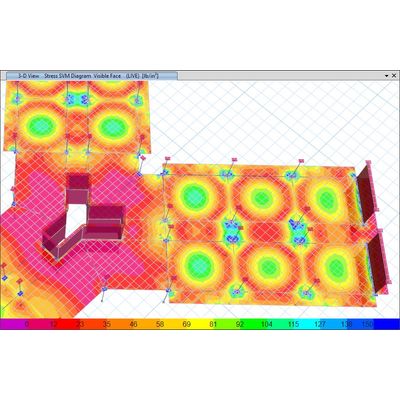
Deformed geometry can be shown after running the analysis. Values are displayed instantaneously when hovering over the model. The deformed geometry can be displayed as filled or line contour plots
Supported Interoperability

SAFE offers numerous interactions between various CSI software and third-party products

User Interface

One Window, Many Views
SAFE offers a single user interface to perform modeling, analysis, design and reporting. A new model explorer is available for quick access to objects, properties and forms
Drawing Tools
Many drawing and drafting utilities are built into SAFE to enhance the engineer`s modeling experience. Many of the common industry standard shortcuts and controls are also available.
Intelligent Snaps
Intelligent snaps make model generation simple by detecting intersections, extensions, parallels and perpendiculars automatically. Drawing helper tools will show physical extrusions even when in analytical draw mode.

Architectural Tracing
Architectural DXF or DWG files can be imported into the background and used as tracing paper to generate slab geometry. Alternatively, the architectural shape can be converted into a SAFE structural object automatically by right-button click.
Templates
SAFE offers a variety of templates for quickly starting a new model including flat slabs, two-way slabs, basemats, waffle slabs, ribbed slabs, composite floors, and single or combined footings
Model Views
View and manipulate models with great precision
Physical Model
The physical model is made up of objects that represent the physical structural members. Physical model views accurately display insertion points, member orientations, object intersections, and other geometric details captured by the object model.

Analytical Model
Analytical model views display the finite element model of the structure which is made up of the connectivity of the joints, frames, and shells and defined meshing. When the analysis is run, the analytical model is auto-generated from the model and its assignments and settings.
Grid Systems
In SAFE, grids can be defined as cartesian, cylindrical, or general free-form grid systems. There is no limit to the number of grid systems in a model and they can be rotated in any direction or placed at any origin within the model
Interactive Database Editing
With interactive database editing, model data can be edited from a table view which simplifies the task of making changes to the model. Tables are easily exportable and importable from Microsoft Excel and Access.
Object-Based Meshing
Object-based meshing generates meshes based on the specified maximum element size, allowing for primarily quadrilateral elements and transitioning to triangular elements as needed
Dimension Lines
Dimension lines can be drawn on the SAFE model in both architectural or decimal units. They are linked to the referenced object so that if the size of the object changes, so will the dimension line.