


Computers and Structures, Inc.
- Home
- Companies
- Computers and Structures, Inc.
- Software
- Version SAP2000 - Structural Analysis ...
Version SAP2000 -Structural Analysis and Design Software
The SAP2000 name has been synonymous with state-of-the-art analytical methods since its introduction over 45 years ago. SAPFire® Analysis Engine: CSI solvers have been tried and tested by the industry for over 45 years. The SAPFire Analysis Engine can support multiple 64-bit solvers for analysis optimization and can perform both eigen analysis and Ritz analysis. Parallelization options are available to take advantage of multiple processors. SAP2000 offers a single user interface to perform modeling, analysis, design, and reporting. The customizable SAP2000 interface allows users to define window layouts and toolbar layouts.
DirectX Graphics
DirectX graphics have been enhanced for quality and speed. Lightning-fast DirectX graphics with full 2D and 3D drafting and selection capability. DirectX graphics with hardware-accelerated graphics allow for navigation of models with fly-throughs and fast rotations.
Sophisticated and efficient meshing techniques
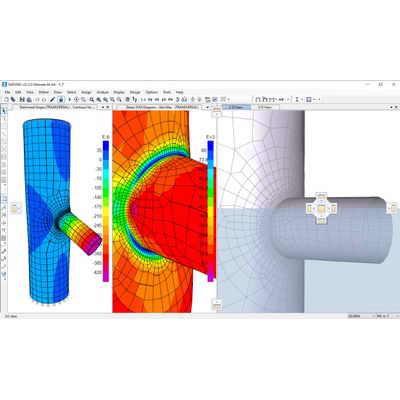
Engineers have many options when it comes to mesh generation in SAP2000. Notable meshing features include the ability to merge independently defined meshes among frame, shell and solid objects, coordinate tessellation with object orientation, and observe material boundaries to establish effective aspect ratios.
Design Codes
SAP2000 offers a wide range of code-based design features for steel frame, concrete frame, cold form steel, and aluminum frame.
Completely Customizable Graphical User Interface
SAP2000 offers a single user interface to perform modeling, analysis, design, and reporting. The customizable SAP2000 interface allows users to define window layouts and toolbar layouts.
Enhanced DirectX Graphics
DirectX graphics have been enhanced for quality and speed. Lightning-fast DirectX graphics with full 2D and 3D drafting and selection capability. DirectX graphics with hardware-accelerated graphics allow for navigation of models with fly-throughs and fast rotations.
Manipulate Models with Extreme Flexibility
Engineers have the ability to manipulate models with extreme flexibility with the use of dockable windows, floating forms and multiple views.
Multiple Views
Users can view moment diagrams, load assignments, deflected shapes, design output and reports all in a single screen.
Floating Forms
"Assign" and "Select" menu forms have been enhanced so that they may remain open for repetitive use with a new "Apply" button.
Dockable Windows
Windows can be organized to fit the user`s needs. There is no limit on the number of model windows, views for model manipulation and data views.
Intuitive 3D Object-Based Modeling Environment
From its 3D object-based graphical modeling environment, this intuitive interface allows you to create structural models quickly without long learning curve delays. Now you can harness the power of SAP2000 for all of your analysis and design tasks, including small day-to-day problems.
Sophisticated and Efficient Meshing Techniques
Engineers have many options when it comes to mesh generation in SAP2000. Notable meshing features include the ability to merge independently defined meshes among frame, shell and solid objects, coordinate tessellation with object orientation, and observe material boundaries to establish effective aspect ratios.
Versatile Modeling Tools to Create Any Type of Model
Many modeling options are completely integrated across one powerful user interface including Interactive Database Editing, Diaphragm and Edge Constraint Assignment and Section Designer.
Interactive Database Editing
CSI software stores model data and other information in database tables which may be directly edited through interactive database editing. This powerful feature allows models to be developed quickly or edited.
Diaphragm Constraint Definition
Rigid diaphragms have infinite in-plane stiffness properties. They therefore neither exhibit membrane deformation nor report the associated forces, whereas semi-rigid diaphragms simulate actual in-plane stiffness properties and behavior. Rigid diaphragms produce results nearly identical to those of semi-rigid diaphragms, while taking advantage of faster computation.
Meshing Tools
The Automatic Edge Constraint is an internal algorithm addressing the issue of mismatched meshes. For example, if the nodes of a ramp and a wall do not match up, SAP2000 will internally connect all mismatched meshes using the algorithm to act as a zipper between the elements.