


- Home
- Companies
- Hottinger Bruel & Kjær A/S
- Software
- Version Type 7708 - Time Data Recording ...
Version Type 7708 -Time Data Recording Software
Gathers data in the field for later post-processing and analysis on a standard laptop, making it a stand-alone, multi-channel data acquisition tool. Recording at the same time as performing real-time analysis is possible with PULSE Data Recorder Type 7701, which can be embedded into a PULSE project to archive time histories while simultaneously analysing the data.
- Recording time-data for later post-processing
- Ideal data acquisition tool before using PULSE Reflex™
- In-the-field recording, event identification and troubleshooting
- Listening to signals before and during recording
- Run-up and run-down test recording
- High-end laboratory recording with 500+ channels
- Simultaneous real-time analysis and recording
- Multiple bandwidth recording
- Supports all PULSE front-ends as well as a variety of VXI modules
- Simple and intuitive controls
- Dynamic range up to 160 dB using Dyn-X input modules
- Easy hardware setup spreadsheet with copy/paste from Microsoft® Excel®
- Meta-data support for PULSE Reflex database
- Live monitoring of signals – listen to your signals during recording
- Event markers – for automatic region selection in PULSE Reflex Time Editor
- Choice of manual or triggered recording
- Multiple recording modes
- Automatic indexing of files for efficient post-processing
- Time history profiles for verification of recorded data
- Optional data review and trim before saving
- Exports in a wide variety of formats
PULSE Time Data Recorder is an economical replacement for instrumentation tape recorders for portable or in-vehicle recording from one to hundreds of channels directly to hard disk. Whether in the field or in the office, the time files produced can be analysed in PULSE using either PULSE LabShop or the extensive post-processing facilities of PULSE Reflex.
With its intuitive user interface and advanced front-end connectivity, you can use PULSE Time Data Recorder with all PULSE front-ends giving you the full advantage of automatic recognition of transducers with TEDS (Transducer Electronic Datasheet), increased dynamic range with Dyn-X technology as well as the high flexibility and modularity LAN-XI front end modules.
Through the VXI front-end driver, Brüel & Kjær`s PULSE data acquisition software can acquire data from VXI hardware for use with PULSE Time Data Recorder Type 7708 as well as PULSE LabShop Data Recording Type 7701.
Type 7708 includes PULSE LabShop Data Recording Type 7701 allowing simultaneous real-time analysis and recording on very large channel counts.
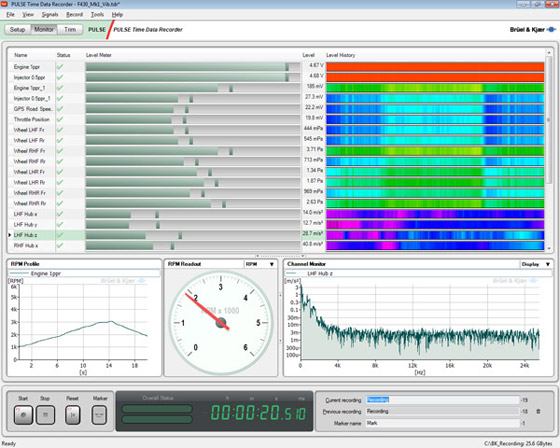
The acquisition setup is simplified by using a spreadsheet interface where complete channel information can be copied and pasted between rows for multiple channels that share (nearly) identical setup. Values in cells can also be duplicated in adjacent cells by dragging across multiple cells.
During setup and recording, all active channels are monitored with the input level meter and the level history, which helps identify channels with intermittent problems. For more detailed monitoring, you can select any channel for display as a time signal or as a realtime spectrum, while cable problems or overloads are automatically detected and indicated by the software. As an added diagnostic tool, you can also monitor the selected channel through the PC’s audio output.
One channel can be selected as tachometer input channel allowing RPM speed monitoring using instantaneous RPM Readout or RPM Profile. The tachometer channel can as well be used for triggered run-up/down recordings.
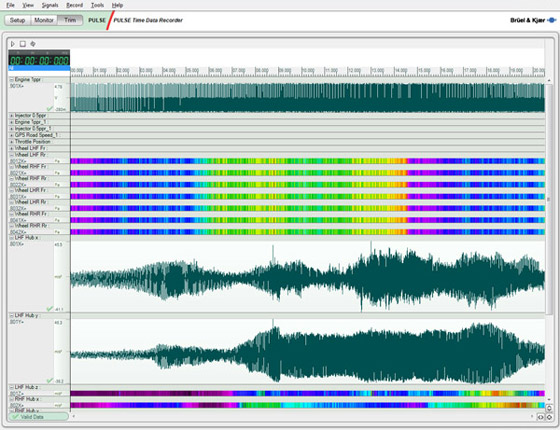
You can choose to save the recordings automatically, or to switch to the trim (time edit) screen immediately after the recording has stopped. In this view you can drag the mouse to select the range of the recording to save permanently. You can then optimize the selected range by using the playback controls to listen to the range in single play or loop mode.
Recording modes
There are several different recording modes to suit different situations:
- Manual recording mode
- Multi recording mode
- Circular buffer recording mode

The most common recording mode is manual start and stop using the transport controls. During recording, you can mark events using the marker button.
A multi-recording is a series of recordings initiated by clicking start and stopped after the specified number of recordings has been reached or by clicking stop.
In situations where the exact duration of a test is unpredictable, but the period leading up to the end of the test is the most interesting, there is a circular buffer mode with user-defined recording length.
Triggered recordingFor automated recording, a trigger channel can be used to start recording when a predefined level or rotating speed has been reached, and similarly stop recording. The triggers have built-in, user-configurable intelligence to deal with less-than-ideal trigger signals which, for example, may fluctuate around the trigger point.
This kind of recording is ideal when you know the time frame of events to be recorded – for example, a run-up/run-down or a specified frequency sweep controlled by a generator.
Using delayed start in connection with multi recordings gives the possibility of recording for a specified length of time at a repeated time interval, for instance a 10 minute recording every hour. The end of the set of recordings is defined by the maximum number of recordings
PULSE Time Data Recorder Type 7708 is a stand-alone multi-channel data acquisition tool and requires only a hardware driver for PULSE LAN-XI / IDAe Type 3099-A or VXI modules Type 3099-D.
Type 7708 includes PULSE LabShop Data Recording Type 7701PULSE Data Recording Type 7701 is part of the PULSE LabShop suite allowing simultaneous real-time analysis and recording on very large channel counts. Type 7701 supplies a data recorder instrument which allows time history data to be recorded directly to disk for subsequent playback and analysis. The recorder has a baseband frequency span of 1600 Hz to 204.8 kHz per channel, with upper limit dependent on acquisition hardware.
The channel x bandwidth product is dependent on both acquisition hardware and PC configuration but a total rate of 1200 kHz can be expected for a typical system, with rates exceeding 2 MHz for specially configured PCs.
As well as being useful for general data gathering, the Data Recorder is useful when the real-time demands for analysis are excessive. The Data Recorder can be used to record the data to a hard disk and analysis can be performed afterwards using PULSE LabShop or PULSE Reflex.
Simultaneous recording and analysis
While recording data to disk using a data recorder, you can simultaneously perform an analysis on all or some of the channels. See the Analysis section for more information on the PULSE LabShop analysis tools.
Multiple bandwidth recording
PULSE LabShop supports multiple recorders:
- Recording in PTI file format
- Recording bandwidth with decimation
- Bandwidth individually selectable for each recorder
- Recording only the selected signal groups + all auxiliary channels
Triggered recording
Type 7701 supports single, repetitive or cyclic recording modes.
- Single triggering records one track only. On completion of measurement you can then select a new track and make a new recording.
- Repetitive triggering causes a number of tracks to be recorded. Repetitive triggering is useful for, for example, recording 2 seconds of data every 2 hours. All tracks recorded during a session are stored. The last track will be recorded when the specified maximum number of tracks is reached.
- Cyclic triggering also causes a number of tracks to be recorded, but in this case, if the stop trigger has not occurred when the maximum number of tracks is reached, the first track is overwritten, and so on and recording stops only when the stop trigger conditions are fulfilled.
PULSE Time Data Recorder Type 7701 requires minimum one of the LabShop analysis tools FFT and/or CPB Type 7700/7770/7771.