


- Home
- Companies
- J Street LIMS
- Software
- J Street - Version LIMS - Windows-based ...

J Street - Version LIMS -Windows-based Laboratory Information Management System
J Street LIMS is an affordable, easy-to-use Windows-based Laboratory Information Management System. Originally named “MSC-LIMS” and supported by Mountain States Consulting, our LIMS has served the laboratory information management needs of diverse clients since 1996. J Street LIMS is currently used by analytical labs in water/wastewater testing, commercial environmental testing, food testing, petrochemical testing and many other laboratory settings. J Street LIMS is a flexible, powerful, secure, and compliant system designed for small to mid-sized labs.
J Street LIMS is a Windows-based laboratory information management system available in both single-user and multi-user versions for workgroups of up to 25 simultaneous users. It is suitable for labs processing up to 75,000 samples per year and up to 300,000 analyses per year.
Laboratories can ensure their laboratory data is well-organized, accessible, secure, and easily reportable by using J Street LIMS. Our system can help your lab increase efficiency, productivity, accuracy, and client satisfaction–all at a very low cost compared to other LIMS on the market. Take a look at our Features page for a concise breakdown of what J Street LIMS can do. But the benefits don’t stop there.
J Street LIMS uses Microsoft Access for Windows with a SQL Server back-end database for industrial-strength performance, security, and scalability.
The Messaging component can be used to implement internal or external/B2B electronic data transfer. Sample information can be sent automatically via email, fax, or through customized integrations. It includes a number of messaging styles ranging from plain text to attached files in rich text, PDF, Excel, HTML, and XML formats.
We include a J Street LIMS User’s Guide, J Street LIMS Messaging User’s Guide, Installation Guide and Release Notes, and a robust Support area containing a knowledge base and instructional content.
Each active J Street LIMS license includes unlimited technical support and version updates. See Pricing for more details.
Single Sample or Batch Login
Log individual samples by selecting a project, location, sample type, customer, etc. To speed logging of repetitive samples, define a login batch with any number of samples with various characteristics. Use dynamic batch login to quickly log a group of samples with similar traits.
Results Entry by Sample or Analyte
Scan a barcode on a container label, worksheet, or bench sheet and enter results for all analyses for a single sample. Select an analyte and include sample query criteria to enter analysis results across samples and to create analytical batches for QC data entry.
Integrated Excel Interface
Import sample data and analyses to log samples. Import results from instrument data files, create custom reports from data in any LIMS report, and create custom analyte-specific data entry screens to calculate and import final results and QC data.
Integrated Messaging
Automatically send an email or fax with sample information when a sample is logged or completed. Message styles range from plain text to attached files in rich text, Excel, HTML, PDF, and XML formats. Configure message recipients by customer or project.
Sample Scheduling
Schedule samples to be logged by a specific date and optionally repeat at a given frequency (weekly, monthly, etc.). The system automatically generates a warning when a scheduled sample is due.
Sample Tracking And Warning
Prevent lost or expired samples with automatic warnings when a sample has an analysis due. Tracking features include quick location of incomplete or past-due samples and samples with warnings.
Quality Control
Log QC samples and generate QC control charts. Define QC data types by analysis. Create analytical batches, enter QC data by batch, and print associated QC data with sample results.
Powerful Queries
Query sample data for viewing/printing using any combination of available criteria such as project, location, sample type, sampler, collection date, etc. Use structured query language (SQL) for additional capabilities.
Reports, Charts and Statistics
Use an extensive list of reports to collect, present, and analyze lab data. Generate chain-of-custody reports, bench sheets, and worksheets. Use the report generator to design and create your own custom reports. Export report data to spreadsheets for further analysis.
Billing Module
Maintain customer lists and assign costs by analysis, project and customer. Generate detail and summary invoices. Combine this with the Messaging component for automated client invoicing.
Instrument and Procedure Lists
Maintain instrument and lab procedure records and generate calendars with instrument maintenance, calibration, and procedure schedules.
Integrated Barcoding
Automatically generate barcoded container labels when logging samples. Speed results entry by scanning sample containers or barcoded worksheets or sample lists.
Data Access Security
Control system and data access using a multi-level security structure. Add user login accounts to one of four security roles with different system privileges: ReadOnly, Samplers, Technicians, and Administrators.
Audit Trail
Track data modifications using the integrated sample audit trail.
Method Development
Develop and document analysis methods.
A Laboratory Information Management System (LIMS) is software designed to electronically store laboratory data. It is the accepted standard for data storage and retrieval throughout the analytical laboratory industry. Though each commercially available LIMS has different features, in general a LIMS allows you to log a sample into the system, enter analyses, and record and retrieve test results electronically.
Not only do LIMS systems allow laboratory professionals to store complex testing data, many also enable reporting capabilities for labs to make sense of their data. After all, what good is your data if you can’t gain valuable insights from it? Many LIMS systems can also be integrated or configured with 3rd-party software to streamline operations, enhance scientific processes, or report results to satisfy state or federal reporting requirements. J Street LIMS can do all this and more.
LIMS systems also ensure the utmost quality assurance standards for test sample management. Laboratories in many industries are often required by law to operate a LIMS system to ensure compliance in their data management practices. It’s safe to say that LIMS are vital, mission-critical components in plenty of laboratory settings.
Scientists, lab workers, and support staff of laboratories in all disciplines use LIMS systems to organize their data. If your lab performs sample testing or records analyses, there’s a good chance you either already use some type of LIMS—or could benefit from using one. Some labs try to organize this data in unwieldy spreadsheets, which take extra data entry labor and are prone to error. J Street LIMS is perfect for small to mid-sized labs. Many of our customers operate in commercial and municipal water/wastewater testing, commercial environmental testing, food testing, petrochemical testing, and microbiology settings.
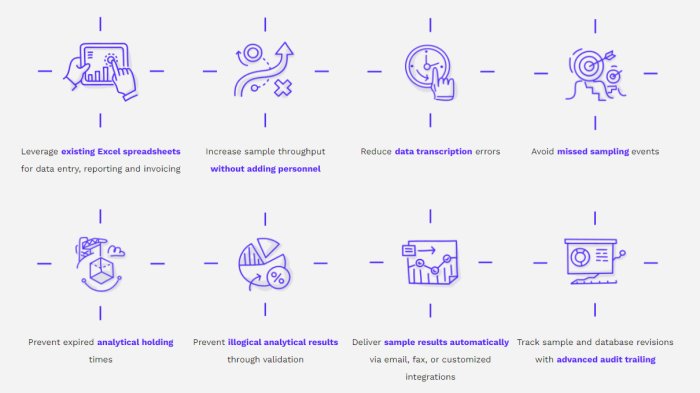
Let’s not sugar coat it. It can be challenging for labs to adopt new software and implement new data management practices. But taking the leap to gain control of your lab data is well worth the investment, and J Street LIMS makes it easy to do so. Our LIMS is an affordable solution that can be quickly onboarded and configured to your existing processes. You don’t have to overhaul your processes to fit the LIMS. Instead, allow the LIMS to compliment what you already do. In no time, your lab will come to love J Street LIMS and will reap these benefits below.
- Enter data once
- Retrieve data quickly
- Eliminate lost data
- Generate and send reports
- Generate Invoices
- Add new configuration data
- Increase throughput
- Generate productivity reports
- Schedule routine tasks
- Adapt J Street LIMS to YOUR lab routine
- Document lab output
- Provide access to data to outside personnel
- Reduce errors
- Verify data at input
- Enhance quality control
- Avoid missed deadlines
- Avoid embarrassment of false results
- Configure reports to meet customer needs
- Automate communication with customers
- Invoice customers
- Industrial-grade security from SQL Server
- Establish secure access
- Track database revisions through audit trails
- Protect your data during transitions or version upgrades
- Easy installation, no extra cost
- Migrate existing data
- On call by phone or email
- Rapid response time
- Streamlined renewal and version updates
When searching for the best LIMS for your lab, it’s smart to ask whether it is capable of interfacing, exchanging data, or integrating with other technology or common third-party software. Our customers rely on J Street LIMS to manage their sample and analytical data, but for some labs this only solves part of the puzzle. Most commercial laboratories are required to submit data to customers, and many labs in environmental settings are required to send data and reports to regulatory agencies for compliance. At the end of the day, there’s a good chance your laboratory data might have to leave the LIMS at some point, but J Street LIMS makes interfacing and integrating seamless while keeping all of your data intact.
Here’s what you need to know about J Street LIMS interfaces and integrations:
COMMON INTERFACES AND INTEGRATIONS:
- Microsoft Excel interface for easy data imports and exports, custom reports, and templates. If your data comes from or goes to Excel, the possibilities are endless.
- The Messaging feature is frequently used to send sample analyses to customers, or customized to interface with various reporting methods required by government agencies. Can also be interfaced with external database systems (ERP, LIS, Process Control, etc).
- Ability to integrate with notable accounting software (Quickbooks, Sage, etc).