Risk Management Technologies

ChemAlert - Environmental Training Courses
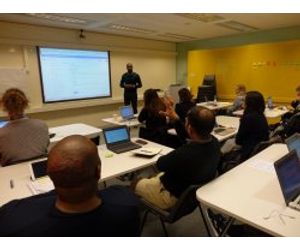
Our Public Training Courses are conducted in professional training facilities in CBD locations around Australia and New Zealand.
Most popular related searches
risk assessment
safety data sheet
environmental training
chemical footprint
locating system
dangerous goods
safety data
hazardous chemicals
health hazard
product safety data
Comprehensive User Course
Duration: 3 Days
Cost: $1490 +GST per person
Outcomes
Participants will get practical training in all aspects of using ChemAlert including:
- Learning the ChemAlert navigational controls;
- Locating Products & accessing Safety Data Sheets;
- Generating Chemalert reports & labels;
- Review Product Details information, including Chemical Footprint and health hazards;
- Managing the Location Hierarchy & Stock Inventory;
- Generating Stock reports to assist with regulatory requirements including Hazardous Chemicals and Dangerous Goods;
- Compile & review a Chemical Request to bring a new product to site, and understanding the Request workflow;
- Understanding the differences between a `Simple & Obvious` and `Detailed` risk assessment;
- Conduct & approve a detailed risk assessment, and understanding the Risk workflow;
- Administrative, Business Unit, and User preferences including Interest Profile management;
- Managing Users, Groups and security permissions; and
- Understanding Analytics and Action Boards.

Duration: 1 Day
Cost: $500 +GST per person
Designed for staff with extensive ChemAlert knowledgewho need an overview of the new features.
- Review improved stock register features;
- Navigate through the updated Stock Module;
- Discover new Location properties;
- Generate new Stock Reports;
- Review Analytics and Action Boards;
- Set up Interest Profile notifications;
- Locate products using new or updated tools including barcoding;
- Review improved Product Details information, including Chemical Footprint;
- Generate product labels and build custom labels;
- Navigate through the updated Request workflow;
- Work through the new and improved Risk module;
- Understand the difference between `Simple & Obvious` and `Detailed` Risk Assessments;
- Discover how to build a business specific Risk Matrix;
- Generate a Banned Products list; and
- Review new and updated Admin and Preference features;