


- Home
- Companies
- Loadstar Sensors
- Products
- Model REB5 - Button Load Cell
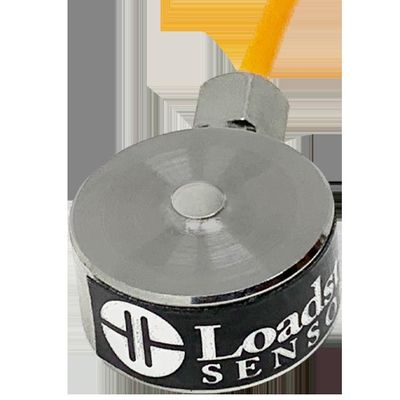
Model REB5 -Button Load Cell
- Capacities
REB5 Button load cells are available in 2 kg, 5 kg, 10 kg and 100 kg capacities. See RSB5 for smaller size and RSB2 & RSB1 for higher capacities.
- Calibration Mode
Button load cells can be used only for Compression measurements. If you need to measure tensile forces then use RSB3, RAS1, RAL1 load cells.
- Accuracy Class & Compensated Temperature Range
+/- 1% of full scale from -10C to 40C
- Construction and Use
Built-in raised surface with curvature for applying compressive loads. Rugged strain relief provided on cable egress for improved reliability.
- UART/USB Output
Use DI-100U with UART output to connect with Arduino or other microprocessors. Or use DI-100U/DI-1000U/DI-400U USB load cell interfaces to connect with PCs via USB.
- Wireless Output
Wireless output via XBee (802.15.4) Industrial Strength wireless or WiFi or BLE for easy connectivity with PCs, Tablets and SmartPhones
- Analog Output
Analog output via 0-5V DC or 4-20 mA output for easy input to DAQ or PLC
- Customize
Call us for larger capacities or other unique needs. We can custom build them to order as needed.
The button load cells have no mounting features to fasten them to another entity. One can sandwich the load cells between two plates or bodies or perhaps lightly glue them to a bottom surface by applying a thin layer of adhesive to the outside edge of the base. The sensors can be mounted in any orientation. Does not need to be verically mounted. The measured force will be the relative force between the two ends of the load cell.
- Load Cell mounted to plate using three through holes
- Load Cell can be mounted in any orientation
- Apply compressive force on to the button
- Flat head screws can be used to fasten load cell to plate
Button Load Cells are based on the classic wheatstone balanced bridge network design using strain gages. The baseline output is mV/V i.e. if you supply say 10V to the sensor, then the output voltage may vary from 0 mV to 20 mV for a 2 mV/V device. They can be mated and used with digital or analog signal conditioners (digital or analog interfaces) to connect with PCs, PLCs, or simple LCD diplays. We offer the following options:
If you need to do testing and data gathering or want to display values on a PC/Tablet via USB, simply connect the load cell to the DI-1000U Digital Load Cell Interface & use the USB connector on the DI-1000 to connect to a PC via the USB port. The DI-1000U is a signal conditioner & 24-bit digitizer (good enough to handle load cells with 0.02% of full scale accuracy) and handles all the communications functions to talk with USB port of a PC. When connected this way, the load cell appears on the PC as a virtual COM port. Using a standard terminal emulator you can send commands to the sensor to display loads on screen. They can be displayed either one reading at a time or in continuous operation mode. You can also use Matlab, LabView or other popular programs to communicate and get calibrated readings from the load cell. It would be best if used our LoadVUE Pro application to display, log or plot data on a PC.