Hydro BioScience, LLC (HBS)
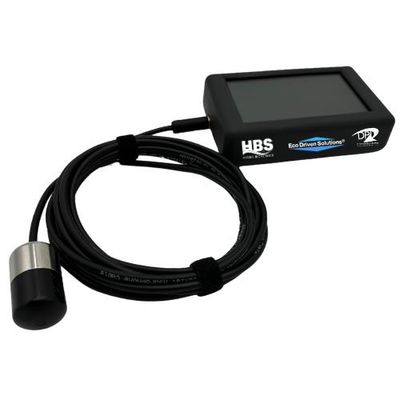
HBS - Sound Pressure Level Analyzer
The NEWSound Pressure Level Analyzer displays sound levels in real-time on a large, full color, high resolution LCD display for immediate assessment and decision making.
Most popular related searches
LARGE LCD DISPLAY
Visualize real-time data with a large, high resolution, full color LCD screen
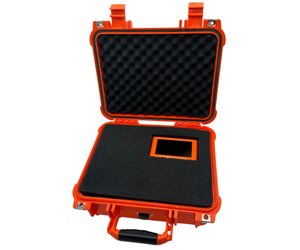
HEAVY DUTY CASE
Rugged, heavy duty, waterproof carrying case supplied, perfect for field work
REAL TIME ANALYSIS
Immediate frequency and power level measurement and analysis
- Real time frequency and power level measurement and analysis
- Large high resolution Graphics LCD touch screen with real time clock
- Standard USB Type-C interface for firmware upgrades and Audio File transfers
- Ample built-in memory to capture and retain audio recordings for playback
- Built-in speaker with adjustable volume, Sound recording available in .wav format
- View data in real time with color graphics charts, graphs and instant values
- Very Wide Dynamic range from 10kHz to greater than 200kHz depending on
hydrophone or microphone used - Microphone and Hydrophone options available
- Bluetooth capable. Works with free Android applications.
- Exceptional battery life with auto shutoff and sleep mode
- Lightweight, ergonomic
- Heavy duty waterproof instrument carrying case supplied
- Available in black and field visibility orange

INSTRUCTIONS
- Download the latest firmware to your computer.
- Plug in the SPL to the computer with the provided USB cable.
- The SPL will usually ask “Allow access to mass storage?” Select Yes. If the SPL does not ask, select Settings – General – Mount USB. See images below. [01, 1a-1c]
- The SPL should now be mounted on the PC. Copy the firmware .bin file to the SPL. See images below. [2a-2c]
- Unplug the SPL. The device will ask “Install new firmware?” Select Yes. See images below. [3a]
- The firmware upgrade process will take about one minute, then the device will automatically reboot. You will now be using the latest version of firmware. See images below. [3b, 3c]