- Home
- Companies
- Xybion Corporation
- Software
- ComplianceBuilder - Version File ...
ComplianceBuilder - Version File (CB-File) -Real-Time Compliance Monitoring Software
In today’s regulatory environment, change management is an essential requirement. Organizations must have the ability to maintain their systems and monitor changes to ensure sustained compliance. Common approaches to address these challenges sometimes includes file polling. This is very inefficient and can often miss certain changes if timestamps and other attributes are not modified. ComplianceBuilder is a unique application that monitors any file-based system for changes including additions, deletions, and file modifications. Upon detecting a file change, ComplianceBuilder stores the file version in a unique, secure data repository for ready retrieval.
CB-File Detects and Monitors the followng:
- Configuration Files
- Excel Spreadsheets
- Word Document Files
- Text Files
- PDF Files
- Graphic Files
- Recipe Files
- Lab Instrument Data Files
- PLC Programs
- Access Databases
- SAS Data Sets
- Any file-based system
File Version Comparison Plug-ins You can install application-specific plug-ins that enable CB / File’s “Compare” functionality. You just choose the two files you want to compare, and CB / File will generate a comparison report highlighting the files’ differences. Plug-ins are available for Microsoft Excel and Word, and for any text file. Multi-Platform Support. Additional application-specific plug-ins can be developed and delivered to suit your specific requirements.
Key Features
File Change Notifications occur whenever a file is added, modified or deleted in a managed directory. CB / File then issues a notification that pops up in the CB Agent window on a designated user`s workstation. You can specify whether notification sign-off is required, and how long CB / File should wait before it “times out” an unacknowledged notification.
Browse Folders using your designated file-based systems for file changes: adds, deletes and modifications. Upon detecting a file change, CB / File stores the file version in a secure Data Repository. You have complete flexibility in setting up your “Managed Folders” file-monitoring program: by specific directory, by workstation or file server, or by file type. CB / File’s Folder Manager page displays managed files and file versions in a Windows-like hierarchy. You can view or download any file, display file attributes, or run the File Compare option.
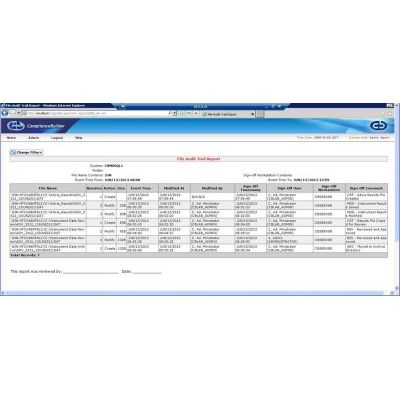
File Audit Trail Report displays file changes in managed directories according to your report selection criteria: by folder, file name(s), sign-off workstation or a date/time range.
ComplianceBuilder Audit Trail Report displays changes made to your managed directories’ configuration and set up over a specified time period.